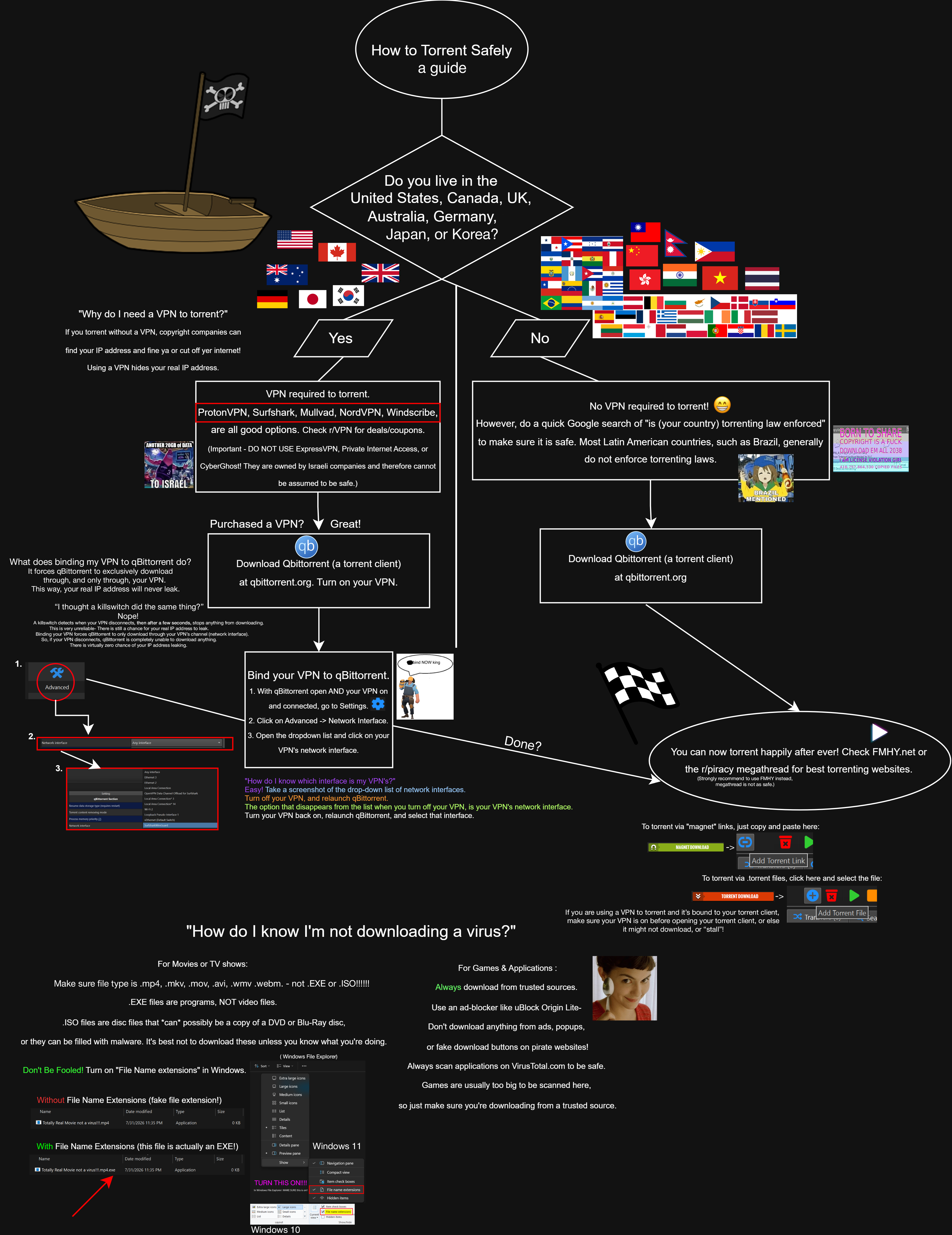
There's been a lot of uncertainty in this community about how exactly to torrent safely, especially on how to bind your VPN to your torrent client, if you even need a VPN, and safe sources for pirated content. So, I made a flowchart and tried to make it as simple as possible while also being thorough with my sources and information. Enjoy!
EDIT: If you live in a European country, please be extra thorough when researching if you need a VPN or not. Sweden and Denmark for example can send letters or fines, France can sometimes do this although it's more rare apparenty.
(ifconfig is a command that shows every single network interface on your computer + what it's connected to, and the -v, which stands for "verbose", simply makes the command spout out more information, such as: the name of the VPN you're using, which is very helpful in our case.)
comb through the list of interfaces in Terminal until you (hopefully) find the name of your VPN listed under one of the interfaces. Then, go to qBittorrent > Settings > Advanced > Network Interface, and select your VPN's interface.
Tip: The names of the interfaces in MacOS are weird jumbly stuff, like gif0, stf0, utun0, utun 1, etc. So make sure you set the right interface ;)
It's also important to note that on reconnects on MacOS, your VPN may switch to a different network adapter and you'll have to repeat these steps if you want a working torrent client.
Fair warning, this is for andriod only. I am not sponsored, just a cool software.
I know most people here already know about this but if you dont, give it a try. Morph allows you to patch apps. For instance, I wanted to use fitbod but didn't want to pay for the subscription or get ads. Just patched it using morph and now I can use all the features.
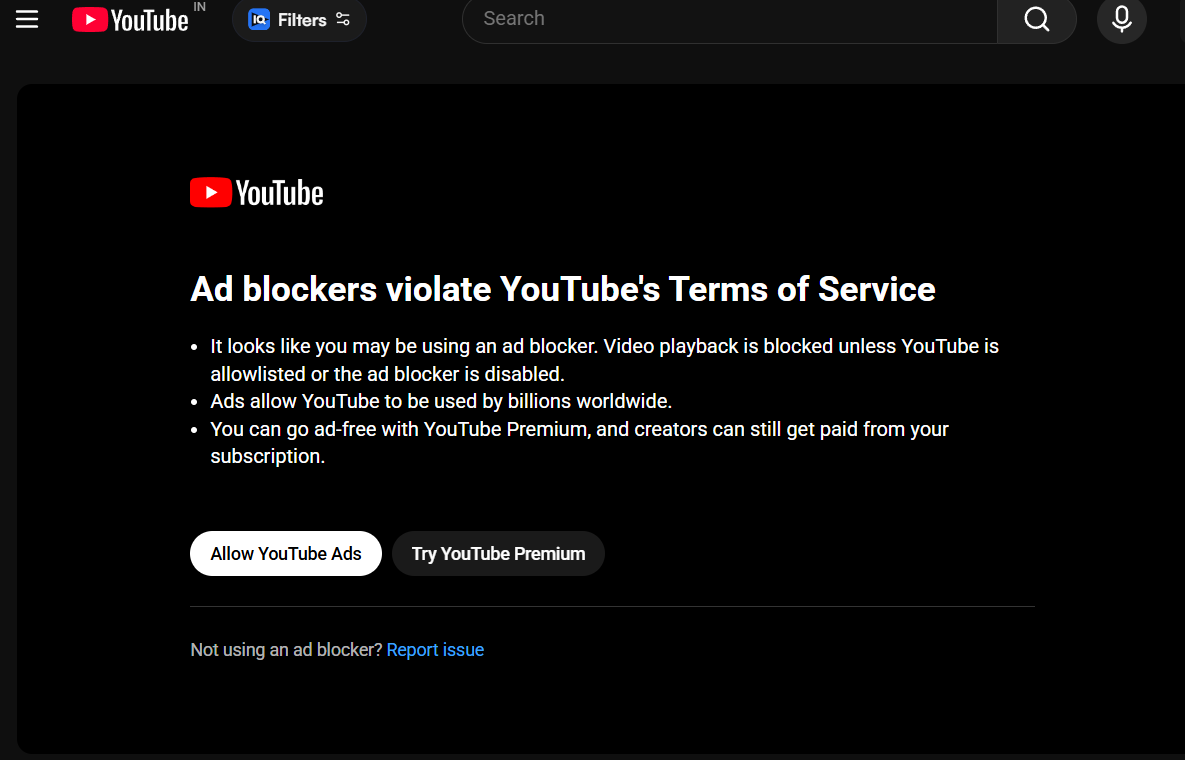
So if you are using Brave Browser to watch youtube without any ads, you might have encountered this error called "Ad blocker violate Youtube's Terms of Service"
An easy fix is to just add a "." at the end of the ".com"
For example, if your YouTube link is youtube.com/x, just add youtube.com./x it will redirect and there won't be any ads.
Just want to share that I found a way to burn my movies in 1080p full hd in normal 4,7gb DVD discs for very cheap. I think I spent less than $100 for 100 movies, and I can always expand my collection for a couple bucks.
I'm not a tech savvy guy or anything, but I found out that you can do that using a format called AVCHD. You'll only be able to play the disc on blu-ray players or on a dvd reader/burner on PC. IT WILL NOT WORK ON NORMAL, OLD DVD PLAYERS. The only thing limiting you is the file size. But you can find good (enough) quality files in very small sizes in popular sites (listed in the megathread).
You need:
- DVD burner/player usb or internal
- blank DVD discs
- Files in formats: Video h.264 mkv, mp4 / Audio AC3
If your files are h.265 I wouldn't recommend converting them to h.264 because you'd lose quality.
If your files are AAC (audio) you need to convert them to AC3
- Programs:
XMedia Recode For converting audio
tsMuxer For generating the AVCHD folder structure necessary to burn the movie in 1080p on the disc
ImgBurn for actually burning the movie on the disc
How to:
XMedia Recode: drag the file > Video tab: COPY > Audio tab: CONVERT, AC3 384 kbps > Add to queue > Encode. It will generate a converted file from AAC to AC3
tsMuxer: Input Files: drag the converted file, subtitles can be dragged in too if you want > choose destination folder > Output: check AVCHD folder > Start Muxing. This process will generate 2 folders BDMV and CERTIFICATE
ImgBurn: Write files/folders to disc > click the browse for a folder icon > select each folder individually BDMV, then CERFICATE. It must look like this:
G:\+ AVCHD\airplane**\BDMV\**
G:\+ AVCHD\airplane**\CERTIFICATE\**
> Device tab: write speed 4x, copies 1, check Verify> Options tab: check Include Hidden Files, File Sistem: UDF and UDF Revision: 2.50 > Labels tab: UDF (the name you want) > Build. It will start burning on the disc
That's it. I tested it and the quality is the same as the original file.
I'm also making my own custom covers in putting them in plastic cases for fun.
EDIT:
I think I found gold or something. People don't believe me haha
I think I 'marketed' this poorly since so many of you missed the point.
The appeal is that
I can have similar to blu ray quality movies homemade using dvd discs for very cheap. It would cost a fortune to make a 100 best movies collection by buying original blurays
The process of doing that is pleasurable. Making your own custom cover and having a physical thing that you made in hand that you can watch when you want.
EDIT 3:
Just found some old dvds that I bought 15 years ago (or more) from random people on the streets, very cheap quality, and they are still running normally.
For those concerned with lifespan of the discs, if they last 10 years the $100 and crafting pleasure were worth it =)
For some reason I’ve figured out that if I place myself with a vpn in Albania, YouTube won’t have any ads.
Probably due to a lack to invest in Albania ads program by Google due to a lack of interest for advertising on YouTube by Albanian advertisers.
I tried different ways to backup all images and videos from Windows to Google Photos for free, but kept hitting brick walls. Morphe Google Photos crashes constantly, older versions run but fail to backup, WSL for Android was unstable, and Android emulators couldn't reliably access or sync my Windows folders. At last, I found the gotohp repo which spoofs the Google Pixel mobile API, but on its own it lacked automatic folder watching and couldn't monitor my actual Windows libraries. So I built the solution myself: an automated PowerShell background watcher and suite that dynamically scans and monitors the exact directories where your media lives (Downloads, Pictures, Desktop, Documents, Music).
Under the hood, it orchestrates the gotohp CLI (all credits to xob0t/gotohp) silently in the background, listening for newly saved, downloaded, or copied photos and videos in real time. Whenever a file is detected, it uploads it directly to Google Photos disguised as an original Pixel device so it consumes 0 bytes of your Google Drive / Google One storage, even for original-quality 4K footage. It uses a local SQLite database (gphotos.db) to track every upload so nothing is ever uploaded twice, includes a live terminal progress bar or silent 1-click Windows boot auto-start, and requires zero virtual machines or Docker. The code and portable setup are free and open source here:
Not let me be honest, Quora does have some good answers but after an update some while back, most of the writers behind good answers have hid them behind a paywall which requires a plus subscription (which they in return get as a commission). Lol
Piracy Wins as always. Let me dive straight into it.
Step 1: For any answer hidden behind paywalls, click the three dot on the top right and click 'copy link' as shown below.
Step 2: Go to translate.google.com and click the 'websites' option and paste the link.
Step 3: Profit!?
How this works?
Well, Google Translate works like a good proxy here. It sends its bots to get(scrape) the data in order to translate it. And this is how Quora gets fcked.
This was a simple trick and no, clearing cookies and using Bypass Paywall Clean Extension did not work. Neither did 12ft.io.
Context: Videos found in Osama Bin Laden's computer are publically available in CIA's website (including all others some of which are well... Not so pleasant to see)
This guide will be very helpful for absolute beginners who want to start their sailing the high seas journey! This guide is mainly targeted towards people who have never been on the high seas before, so pay attention!
A good VPN if you live in a country that is strict on piracy (i.e. Germany, USA, etc.) for torrenting.
Methods discussed in this guide:
Stremio + Torrentio
Optional: A debrid service (checkout this for explanation)
Streaming stuff from websites
Downloading stuff from torrent sites
Method 1: Stremio + Torrentio
⚠️ WARNING: MAKE SURE TO HAVE YOUR VPN ON IF YOU LIVE IN A COUNTRY WHERE PIRACY LAWS ARE ENFORCED STRICTLY! DO YOUR OWN RESEARCH ON VPNS, I RECOMMEND PROTON VPN!
Step 1: Go to stremio's official website and download it on your device (for this guide I will be using windows 11). After downloading, install it like you would any other app.
Step 2: I recommend signing up for a Stremio account as you will be able to sync all your movies and shows across devices. After you've logged in to Stremio, minimize it and go to Torrentio's official site, scroll down and add it to Stremio!
After clicking this, you will be prompted inside of Stremio to install torrentio, click install!
Step 3: Now go to the home page of Stremio. Select a movie or tv show that you want to watch.
Step 4: Now you will be taken to this page, you should select the resolution you want and the stream which has a good number of seeders!
Step 5: Now enjoy your movie to the fullest!
Method 2: Streaming!!!!!!!!
⚠️ WARNING: PLEASE FOLLOW THIS USING FIREFOX + UBLOCK ORIGIN!
Step 1: Go to fmhy.net and go to the "Streaming" section.
Step 2: Select any of the starred sites from the list.
Step 3: The rest should be pretty self explanatory. If you have any problems, please feel free to ask in the comments!
Method 3: Torrenting the movie
⚠️ IT IS HIGHLY RECOMMENDED THAT YOU HAVE YOUR VPN ON
Step 1: Install a good torrent client, I recommend qBittorrent! Bind your VPN to the client, check out this video on how to do it!
i saw a post earlier about someone asking how we italians get pirated films and tv series. well the post got rightfully blocked by the admins since it was written in italian, but i want to help anyway!
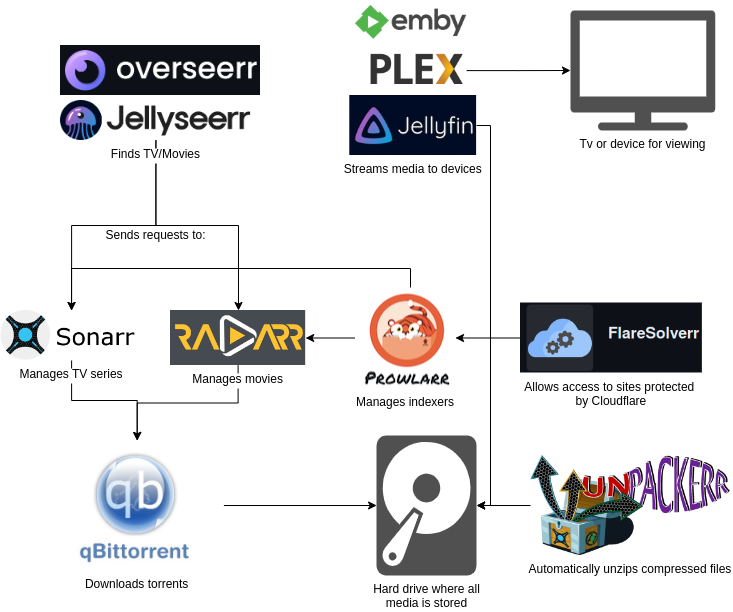
i followed the trash-guides to setup the arr stack into my nas. and it works wonderfully to find films and tv series in ENGLISH. but we want releases in OUR OWN native language!
so here is my suggestion. search through your favourite pirate sites and note down every pirate/group name that shares torrents in your language. for example "mircrew" is pretty famous here in italy but there are many others.
then go to radarr and sonarr and create a custom format that assigns a high score (i.e. +3000) to the releases with the title containing any of the names you noted before. finally edit the profiles so that every release that has a score below +3000 is ignored. this way you can filter only the content that was released by a pirate/group that you know shares content in your preferred language.
the regular expression to use is this: \b(?i)(name1|name2|name3)\b. there are many guides online on how to write a regular expression.
in my case 90% of the time i search something, radarr and sonarr can find it without problem. i say 90% since sometimes the releases are translated (in italian in this case) while radarr and sonarr search the original title or the english translated one, i don't remember. in this case manual intervention is required.
i hope many of you find this helpful.
DON'T DM ME TO SHARE WITH YOU MY LIST OF NAMES, I WILL IGNORE YOUR MESSAGE! GO FIND THEM IN YOUR OWN
Hey guys, this post is a guide for the setup to read books and listen to audiobooks. It covers everything you need to know. While the guide is focused on Android, some parts are universal.
Where to get books?
It is recommended to use z-library.sk (approved by the megathread). You’ll need to create an account, and then you get 10 free downloads daily. There’s no waitlist, downloads are fast, and books are in .epub format. The site also gives book recommendations based on your download history. You can also read online without downloading.
Note: Be sure to use one of these links: z-library.sk, 1lib.sk, z-lib.fm, z-lib.gd, z-lib.gl. Browser search results sometimes show malicious lookalikes.
Note: Why use this and not annas-archive.li? On Anna’s, there are long waitlists, books aren’t always in .epub, and sometimes downloads don’t work (and you only find out after waiting).
Tip: How to find books to read? As mentioned, Z-Library will suggest titles based on your downloads. You can also ask for recommendations on r/booksuggestions (low or no karma required) or r/suggestmeabook (some karma required). Another good option is to ask ChatGPT based on your interests.
How to read books?
There are many e-book readers, and none are perfect, but it is recommended to use Moon+ Reader Pro. It costs $10 on Google Play, but the APK can be found on Mobilism. It offers extensive customization—you can change the wallpaper (an AMOLED one is used in this setup), font type, size, and more. It also shows book progress by percentage, chapter lengths, page counts, etc.
How to get audiobooks?
It is recommended to use audiobookbay.is (approved by the megathread). This is a torrent-based site and an account is required to start downloading.
Note: To download torrents, a torrent client is needed. LibreTorrent from F-Droid is recommended. To download, click the magnet link, open it in the client, and start the download. Once complete, it will begin seeding. If seeding is not desired, simply pause it. After downloading, there won’t be a notification—the file is saved locally and can be found using the file manager’s search function.
Tip: When searching for an audiobook, multiple versions of the same book may appear. These aren’t always identical—some books have both a standard version and a deep-dive version. It is best to choose the one with more narrators or labeled as a deep-dive for a better experience.
How to listen to audiobooks?
Smart AudioBook Player is the recommended app. It’s available for free on Google Play and includes a one-month premium trial (no payment details needed; it activates automatically). It is more recommended to get a premium APK on Mobilism. This player with premium allows users to select chapters, adjust playback speed, and track progress (both played and remaining time), among other features. For books to appear in app, you need to create a folder for audiobooks, mark this folder in app, put audiobook file there and scan for files in the app.
That concludes the guide. If you have anything to add, leave a comment. If you need help, DMs are open.
I want to give everyone a heads-up about a massive malware campaign that's still hitting popular piracy and repack sites.
Most of the danger comes from sketchy file hosts (like datanodes[.]to or multiup[.]io), deceptive link shorteners/containers (like zovo[.]ink or zovo2[.]top), and piracy sites that put invisible click-traps over download buttons, magnet links, and whole pages.
Depending on the site you use, the risk looks a bit different:
Sites with sneaky redirects: Some sites redirect you to dangerous pages. For example, DODI’s main site itself doesn't have these traps directly on its pages anymore, but the links at the top of their new game posts redirect you to game-repack[.]site, which is filled with aggressive shorteners and malicious redirects.
Clean sites with bad external links: Safe sites like FitGirl don't put any of these traps on their own website, but some of the third-party file hosts and link containers they link to certainly do.
If you click any download button, magnet link, or page element on these hosts without a working ad blocker, your browser will get hijacked and forced to open a fake download page designed to trick you into downloading malware.
Here are a few examples of what these fake malware download domains look like (do NOT open these, they are just for demonstration):
Notice how they almost always use cheap, throwaway domain extensions like **.cfd**, **.xyz**, **.top**, or random gibberish strings. The attackers switch these domains constantly once the old ones get flagged.
Quick note: While parts of this campaign are mentioned in the Megathread, I’m sharing this breakdown because people are still getting hit by these exact redirects every day.
So, how do you actually browse these sites safely? You need a proper ad blocker, but because of recent changes under the hood in most web browsers, the browser you use is just as important as the ad blocker itself.
I recently tested this directly on aggressive shorteners like zovo: even with the full uBlock Origin extension installed and completely updated, Chromium-based browsers like Brave and Opera still failed and let the fake download redirects through.
This happens because almost all popular browsers share Google’s underlying "engine" (Chromium). Google built strict limitations into that engine, which prevents ad blockers from stopping bad code in the background before it triggers the redirect.
Here is how browsers stack up right now:
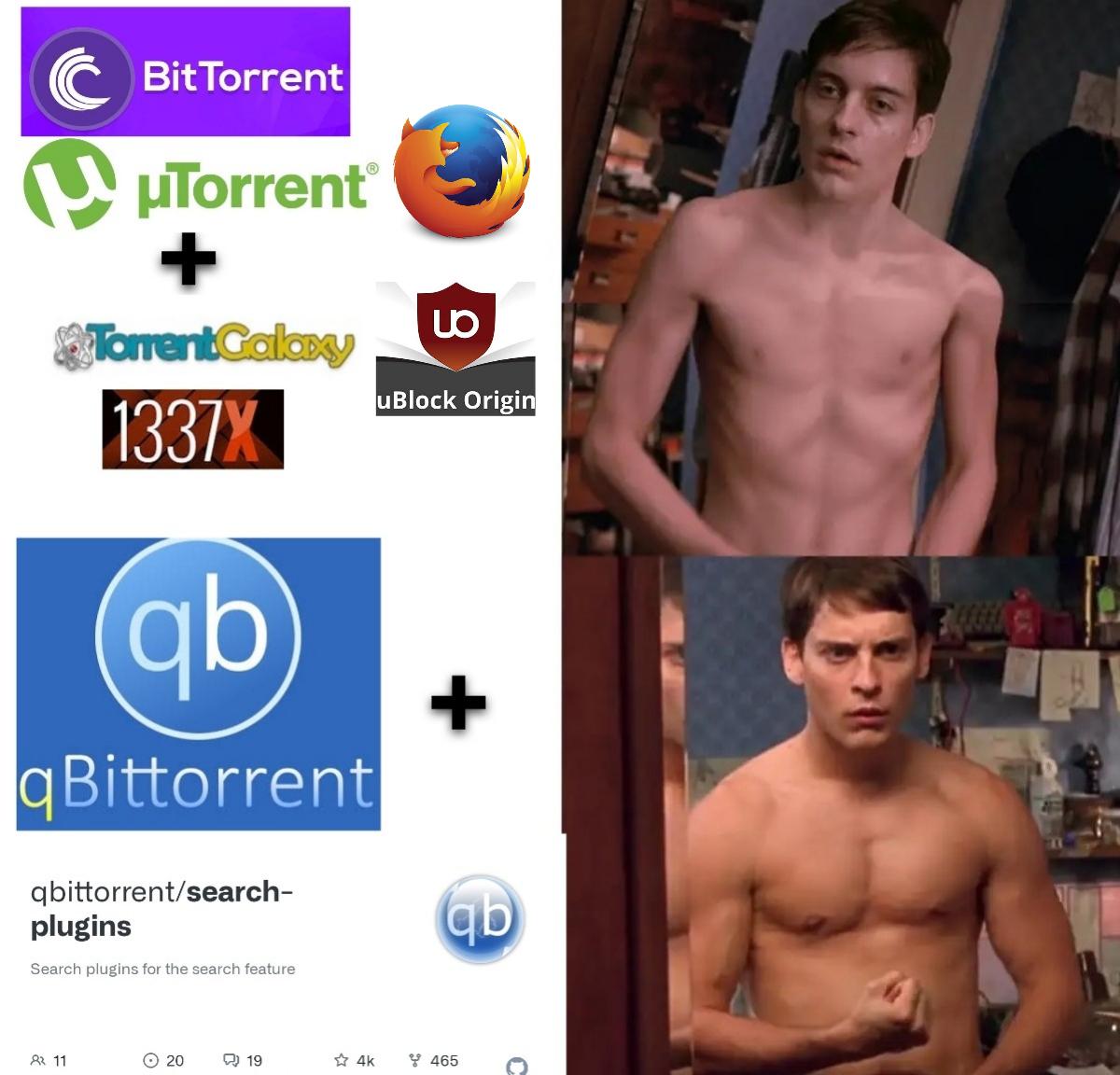
Firefox: Still the absolute best and safest choice. It doesn't use Google's engine at all. Because of this, uBlock Origin works at 100% capacity on Firefox and can block sneaky redirects before the page even has a chance to open them. In testing, Firefox with uBlock Origin is the only setup that reliably stopped these malware links.
Brave, Opera, Chrome, Edge, Vivaldi, and Arc: Not recommended for downloading from these sites right now. Since they all run on Google's underlying engine, they can still leak and open malware tabs on shorteners like zovo—even if you have uBlock Origin installed.
One important tip: Never run two different ad blockers at the same time on any website. Running multiple blockers creates conflicts in how they process background scripts, breaks normal webpage features, and can actually cause redirects to slip through the gaps.
Regarding alternative download methods like JDownloader or torrents:
Using desktop apps like JDownloader2 or a torrent client is generally way safer because the download actually happens inside the app, not your web browser. But how safe it is still depends on the site you're on.
Safe sites like FitGirl give you direct magnet links or .torrent files that you can just click normally. But on sketchier sites, they put invisible click-traps right over the magnet or torrent buttons too. If you click them, you'll end up opening a malware tab instead of launching your torrent client.
The easiest way to avoid this is to right-click the download/magnet button and hit "Copy Link Address", then paste it straight into JDownloader or your torrent app. And as a simple rule of thumb: if a zip or exe file ever starts downloading directly in your browser tab, cancel it immediately.
Here’s a quick snapshot of the hosts, shorteners and file containers to watch out for right now:
Piracy sites, file hosts, file containers and shorteners change their ad setups and links all the time, so what’s safe today might get sketchy tomorrow.
If you notice any sites or hosts changing their behavior or adding bad redirects, drop a comment below. For an updated index of clean sites and hosters, check the FMHY megathread. Keep in mind that even FMHY lists sites with aggressive ads (they usually tag them with warnings or icons), so having uBlock Origin active is still mandatory when using their list.
Example of a malicious redirect page. If you land on a page like this, close it immediately.A typical fake folder structure. While exact file names might change, if your downloaded game folder looks sketchy and doesn't match normal game files, don't open it.
If you launched an .exe or a script (like a .py or .bat file) from one of these sketchy downloads, assume you are compromised.
The loading screen is a trick: If a fake installer or loading window pops up, closing it or hitting "Cancel" won't save you. The second you double-click the file, the code runs in the background. The loading bar is just a visual distraction designed to buy time while the malware works.
Fake loading screen
It targets your logins and accounts: These are infostealers. Their main goal is to collect your browser cookies, saved passwords, session tokens, and crypto wallets, then send them back to the attacker. They don't crash your PC or cause obvious errors—they operate quietly in the background.
Antivirus might miss it initially: If Windows Defender didn't pop up with an alert, that doesn't mean you're definitely clean. New or modified malware variants often evade detection until antivirus databases are updated to catch them.
If you ran any of these files, unplug your internet cable or turn off Wi-Fi immediately to block the malware from sending your stolen data out.
What to do if you are infected (Recovery steps)
If you ran one of these files, do not rely on free antivirus scans or malware removal tools to "clean" your system. Infostealers can leave backdoors, modify startup settings, or drop secondary payloads that traditional scans miss. The only guaranteed way to regain control of your PC is a full, clean reinstall of Windows.
Here are the immediate steps you need to take:
Disconnect your internet immediately
Unplug your Ethernet cable or turn off your Wi-Fi right away. If the malware is still trying to upload stolen session tokens or credentials, cutting the connection limits further damage.
Secure your accounts from a CLEAN device
Do not log into your accounts or change passwords from the infected PC. Use your smartphone or a separate clean computer to change your passwords.
FIRST: Force log out of all active sessions across ALL your accounts.
This is the most critical step. Infostealers target your session tokens and saved logins, which can let attackers access your accounts without needing your password or 2FA code. Go into the security/privacy settings of every account you use (emails, gaming platforms, browser-saved sites, social media, financial services) and look for the option to sign out of all other devices, sessions, or authorized locations. Doing this immediately cuts off their access.
Then, change your passwords.
Start with your primary email (since all account resets go there), financial services, Steam, Discord and so on.
Enable Two-Factor Authentication (2FA).
Turn it on for everything that supports it. (App authenticator is recommended, such as Google Authenticator).
Stay safe and watch what you click.
UPDATE:
The developer of gamebounty[.]world reached out and has completely removed vikingfile and rootz from their platform, and added a warning to their site. This is an incredibly positive step, and huge props to them for taking swift action to protect users.
The developer of union-crax[.]xyz reached out as well and has added a warning to their site about using vik1ngfile[.]site, as it runs unsafe redirect scripts. I highly recommend using their UC.Files direct links instead, as they are safe. Huge props to them for taking swift action to protect their users.
The developer of vik1ngfile[.]site, a widely used hosting service, reported that they removed the malicious redirect from their website. This is huge step forward in securing more users.
The CDM-Project is a collection of tools and scripts gathered from various sources over the web in one convenient place for downloading and decrypting widevine protected content.
Edit: https://cdrm-project.com/ has just been launched, it’s a leaked version of getwvkeys and functions the same.
If you haven't seen my previous posts, you can view them here and here.
To get started start with the How To: instructions, it will take you step A-Z on the basics on how everything works. Once you get that down head on over to the site specific how to's, currently there is Hulu, HBO Max, Disney+, and Udemy.
Even if it's not in the site specific list, if you follow the Obtaining PSSH guide and the knowledge gained from the how to guide on copying headers and getting the license URL, these tools can be used on numerous sites, given the correct headers and license URL.
If you are wondering what's new about this one compared to the last one, I just updated the iOS section and the Mac Section after the release of SpotX for Mac. If you don't have any of those two devices, you don't have to read any of this if you saw the old guide already. Anyways let's get started.
Since this information is scattered all over the place, I figured I would do you guys a favor and try to consolidate all the methods and guides and methods all into one place. With that out of the way, let's get started.
Before we get started would just like to say I didn't invent any of this and all credit goes to their respective authors I'm just trying to make a guide for the rest of us.
Windows
There's 2 methods to pick from. One is BlocktheSpot and there is the DLL injection method. Supposedly the DLL Injection method is better as it's supposed to be more resistant against auto updates and supposedly more stable. But I've only had experience with BlockTheSpot and I've been using it for a while with auto update disabled and I've been pleased with it. You can also use SpotX which is supposed to be based off of BlockTheSpot but has additional features such as update disabling. You can't go wrong with either just use whichever you prefer. Just follow the instructions linked below and you should be good to go.
Edit: Others have discussed using Spicetify and it has an extension to remove ads and the upgrade button. Don't have experience with that but I will link the install instrucitons for those intersted in it.
There's also 2 ways on going about. You can run a script or you can install a pirated version of AdGuard for Desktop then add Spotify to the filtered app list and be good. Honestly, the AdGuard method used to be good but then became a bigger pain in the ass later after some MacOS updates and sometimes connectivity breaks for no reason so I would recommend against that one and use the script method. I made a guide detailing this and it's linked below. But for simplicity I'll just copy paste what I put there and put it here. This one is gonna be long as nobody had made a guide for Mac yet.
New script has been developed by the authors for SpotX but for mac now. It is linked here and just follow the instructions listed. All credit goes to their respective authors. Before, SpotX for Mac didn't exist so it was a giant pain in the ass to block Spotify ads but that now's it's here it's easier than ever.
Edit: Others have discussed using Spicetify and it has an extension to remove ads and the upgrade button. Don't have experience with that but I will link the install instrucitons for those intersted in it.
Install AdGuard For Mac. Found on cmacked.com. More specifically, here.
Add “Spotify” into filtered applications in adguard preferences
Done
Full Instructions
Install AdGuard For Mac. Not the extension but the actual Mac App. It can be found on cmacked.com. More specifically, here. My preferences I would use the link labeled mirrors and download off of Mediafire/Zippyshare (with Adblock on of course). Also make sure that Spotify for Mac is already installed. Not the browser version but the desktop version. The Spotify app should be in your applications folder before starting.
Open the Adguard DMG, do the control click to open the gatekeeper friendly version and follow instructions, then drag it into applications and open AdGuard. Once you open it, just click through and pick what you want it doesn’t matter. What really matters is that you go to the top menu bar, click adguard (near your wifi/battery icons) , then settings, preferences, then click the network tab on the far right. Then press applications, the plus button at the bottom left, then add Spotify.
Enjoy your ad-free Spotify.
Unrelated stuff here you can ignore this. AdGuard I prefer go into filters, press the plus button at the bottom left, and enable all the other lists like easy list, mobile, most privacy & all annoyances ones. Has nothing to do with Spotify but optional if you want to block more stuff in the browser. Also worth noting that when waking from sleep, the ads will resume, just quit Spotify and reopen it and it should go away. This is an AdGuard issue and will be fixed at some point in the future. You can also follow some of the guides in the issue threads of the blockthespot and you could use it to remove some of the ad spacers and the upgrade button but honestly who cares it works. And updating Spotify is just going to bring it back anyways. Also make sure to have AdGuard extension installed as well it can be found in the extensions tab in the preferences for AdGuard.
Linux
Honestly you guys are probably smart enough to figure this one out so I’ll just link the GitHub link here. It’s also because I don’t have any Linux machines so I have no experience with this but many on here have said good things about it. Just follow the instructions on the GitHub and you should be fine.
Edit: Others have discussed using Spicetify and it has an extension to remove ads and the upgrade button. Don’t have experience with that but I will link the install instrucitons for those intersted in it.
This should be a last resort as the browser version isn’t as good as there isn’t any friend activity and I don’t find it as reliable but for those in this situation, just install Ublock Origin and you should be good to go. Safari users can try Adguard for Safari but I haven’t tested this.
Android
You guys have it easy you can just use XManager and be set. Or at least when I used android that’s what I used. You just download the APK then install it and pick the latest app version and you are set. Try installing ARMV8 first and if it fails then do ARMV7 assuming it still asks for that in the app.
Damn I guess iPhone users are really hosed as there isn’t really a good method to use unless you are jailbroken. I’ve tried many Pi-hole scripts and I was still screwed. But if you are jailbroken, just install the Spotilife tweak from julioverne and a app downgrade tweak and you should be good. Just add his repo and you should be good. I have it linked here. And the app downgraded I use is Appstore++ and I have that repo linked below. I personally use version 8.6.22 but later versions might work I just never tested it. I also use the lyrication tweak so I can have lyrics but that’s optional. Repo and the tweak is linked below.
If you really wanted to you could use AltStore and a cracked Spotify IPA and then use that to side load it onto your phone. But that has the disadvantages of needing to be resigned every 7 days. And I have a problem where my computer will randomly not detect my phone. But if you are really interested in that I will have the IPA and the Altstore link here. All you have to do is install AltStore to your phone and then download the cracked IPA onto your phone. Then install the cracked IPA inside of the AltStore app and you should be set for 7 days. I honestly don’t think it’s worth the hassle to reinstall it every 7 days but for those who really want it I have it linked here. I have no experience with this method or if the 7 day resigning is still a problem but for those interested I have it below. Maybe the auto resigning is reliable now but I’m not sure. Just follow the Altstore installation directions on their page and you should be fine. Again cracked spotify IPA’s are below. Be sure to clear spotify app data before install and you should be fine. If you have a paid dev account you can sign apps for 1 year at a time but at that point you’re gonna end up spending money anyways.
Also, before I used to use some random Spotify++ type apps from like tweakbox and whatever but I never really used it because it kept breaking and stopped being verified so I just gave up on it. It’s something worth noting but it’s something I don’t use but if somebody else has a better method or knows what the current way of doing it is they can link it below. Anybody with a better non jailbroken method feel free to leave it below.
Edit: Other users have mentioned using Trollstore. Since I don’t have a compatible device I can’t test this but I will link it below.
And that’s about it really. Just something I wanted to share because I see so many guides scattered all over the place and just wanted to make it easier for beginners. Hope this helped, and enjoy your day. If you have a better method to share please do leave it below. Thanks for the read.