LabPorn One year later… I should’ve listened to you guys.
116
Upvotes
Please help
r/homelab • u/UptimeRobot • 14d ago
Hey r/homelab! We're UptimeRobot, and we've teamed up with the mods to run a giveaway for this community, with a prize pool of 10 monitoring plans, including a year of our Scale plan worth $888. Anyone who's worked in creating a homelab has a story! Now's your chance to share it and maybe win something for your trouble.
What's the weirdest thing you have been monitoring with UptimeRobot or a similar service?
We're looking for the most weird/funny or unexpected use cases!
Prizes (10 winners total)
How to participate
Reply here with your story. You don't have to write an essay. That's it, you're in!
Dates: The giveaway runs from October 12 through October 26.
Looking forward to reading your weird, embarrassing, ridiculous, and funny stories!
r/homelab • u/PoisonWaffle3 • Jun 06 '26
I would like to thank everyone for their feedback in the recent post & poll where we asked for feedback on how to slow the deluge of "I made X, because Y" type posts in r/homelab, most of which are AI generated and/or spam. While we felt that that the initial plan we shared was quite good, with your input we were able to refine that plan and make some notable improvements and clarifications. And yes, there's a TL;DR at the end 👀
Effective now, the below new rules and policies are in effect, though we plan to apply them conservatively and gently at first to see how things go. All of these changes are happening because of the massive community support for them, and we will be seeking additional feedback as time goes on so please feel free to chime in.
To be clear, here are our goals, based on community feedback:
Flair changes that are now in effect:
New Flairs:
We have also organized the post flairs in the list to make them easier to locate.
Both "Project: Software" flairs have a reasonably low minimum subreddit karma requirement to be able to post with them. AutoMod will remove any post with them that don't meet the karma requirement, and inform the user why their post was removed. The minimum karma requirement is only for these two flairs, as we don't want to restrict new community members from being able to post questions. Any software project posts that try to go around this by using a different flair will fall under the new rule #7 and will be addressed.
Rule changes:
New Rule #7 - Software Project Posting Requirements
That said, since we're now officially allowing some degree of self-promotion and requiring links, we felt that we should redefine rule #6 to clarify that it applies only to monetized and commercial advertising/links. Here is the updated verbiage, with the old one below for comparison:
Rule #6 - No Commercial Advertising or Monetized Referral Links
Rule #6 - No Referral Links/Advertising/Company Advertising
Flair Prompt - As mentioned in Rule #7, when posting with any of the "Project: Software" flairs, the below prompt will be displayed:
Your post MUST include:
If you see any posts with a Project: Software flair that do not meet the four items listed above, please report them to the mod team under Rule #7 and we'll address them.
Additional things to note:
Existing posts will be grandfathered in, and previous posts that were removed may be reposted if they meet the new requirements. New posts will be required to comply with the new rules.
As with the existing rules, when a mod removes a post for violating this new rule, a canned response will be sent to the user to inform them why their post was removed. Mods are able to add on to the response if desired before sending it.
While we're on the topic of AI, we would also like to clarify that the above rules are specific to the use of AI in software projects that are being shared, and they do not apply to posts or comments that were written with AI. There is some dissent in the community, but the general consensus in the community has been that a reasonable level of AI usage is acceptable for putting a post together, correcting grammar or formatting, or for translating from a user's native language. That said, best practice is to not include all of the excess emoticons and outline formatting that LLMs like to use. If a post or comment is egregiously AI generated, feel free to downvote it and move on, but please do not report it to the mod team solely for that.
We would also like to note that there has not been any opposition to posts about hosting your own LLMs, and the hardware/software involved. The new rules do not apply to these posts as well.
We're looking for community feedback as we all get used to this. We plan to apply rules conservatively and gently at first, and will be listening to user reports and comments. If your post is removed and you believe it meets the requirements, please chat with us via Mod Mail and we may consider either re-opening it or letting you repost it.
TL;DR - All posts where someone has made some sort of software (AI generated or not) will require a "Project: Software" flair, and these flairs should curb the vast majority of the low quality and spammy posts.
Thank you,
The r/homelab Mod Team
Edit: The first day with the new rules has gone very well overall, but it has demonstrated that there is room for improvement, namely with flairs and categorization.
Here are the changes we've made since the initial announcement post:
We're still open to suggestions from the community. Thanks!
r/homelab • u/Stone_mount • 7h ago
Finally got my first homelab up and running!
Been piecing it together over the last few weeks.
Running Proxmox, Docker, Cloudflare Tunnel, WireGuard, a NAS, Pi-hole, and a Mac mini for automation and AI experiments.
Wanted something compact but still capable of handling a bunch of different projects.
Still learning and tweaking things, but pretty happy with how it’s turning out!
Any suggestions or things you’d change?
r/homelab • u/alabamashitfarmer • 16h ago
Left the door to the lab open when I kicked my old girl out of the bathroom this morning, and she found the next warmest spot in the house. I found Princess Fluffybutt sleeping peacefully on my mission critical single point of failure.
I love this old-ass cat so much. She's 23 years old. I know we don't have long together, so she gets away with everything.
I don't have the heart to move her yet. Work can wait; keep the fans slow at least. I can putter until she wants lunch.
Time to drag up the air compressor again.
r/homelab • u/Artistic_Meal_8440 • 1h ago
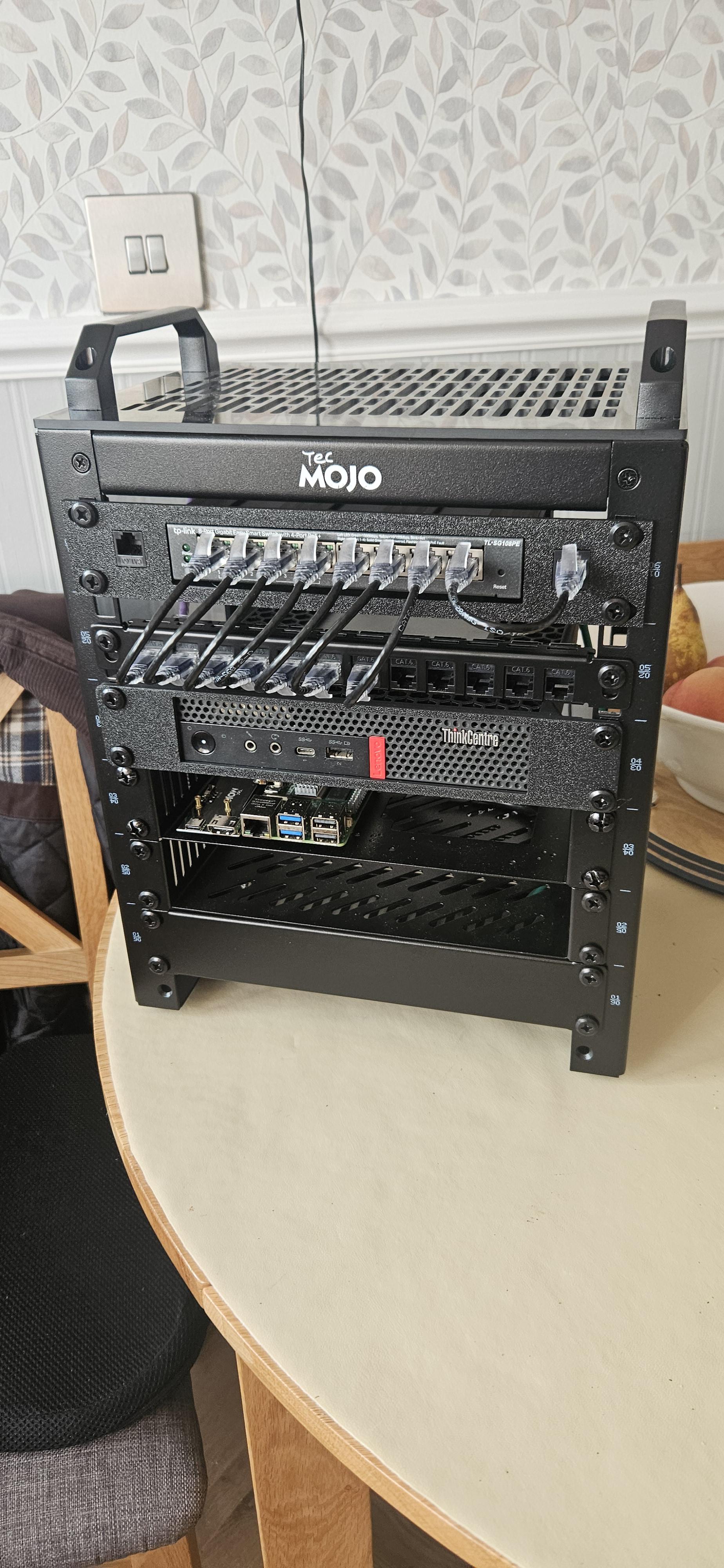
After months of debating I finally started on my homelab
Specs
- tp link managed switch
- ryzen based thinkcentre 16gb ram 2tb ssd 512nvme
- pi5 8gb
- tecmojo 10" rack
The main plan is to get open media vault and jellyfin running as well as hosting a couple of game servers (minecraft,dragonwilds) and maybe a couple of other bits, im now debating on if i swap the pi out for another thinkcentre.
r/homelab • u/IllustriousDress2908 • 9h ago
After the red 3-node Lab Rax, I built a second one, this time in blue and with a different goal: something a non-technical person can plug into their router and actually use every day without ever opening a terminal.
What it does:
What's inside:
Software side:
Lessons learned: the Datto wouldn't come back after a power cut because its CMOS battery was dead, and it's not a regular coin cell but one with a 2-pin connector, so I had to order a CR2032 with leads. Also, going full DHCP + mDNS instead of static IPs made the whole thing portable, which was the main point of this build.
Happy to answer questions about the case or the setup!
r/homelab • u/antitrack • 16h ago
I just got an email, it’s available and single units for $39 ship end of October, 3-packs seem to ship after November. Looking good, I ordered one, $19.99 shipping to Europe though.
(i am not affilated, just excited since I have the “big one” and find myself connecting it from one NUC to the other constantly and just added another NUC)
r/homelab • u/Icy-Bodybuilder-692 • 11h ago
Hi everyone, this is my homelab server. It’s running an i9 11900k, 32GB DDR4, 8 hotswapable 4TB sas drives in raid 5, 2 256GB NVMEs, 1gb internet (mobo supports 2.5gb), running Cockpit. I’m using only for Plex atm but it’s been super reliable and I love this old Cooler Master case I built it in. Although this adds substantial weight, with drives and hardware included it is a brick. I was thinking of adding home automation as well, just don’t know where to start 😬
r/homelab • u/throwaway0204055 • 14h ago
I have Wireguard VPN configured on my Unifi Dream Router and have the client and cert installed on all my devices. Why would anyone need a travel router when they can just deploy the VPN app and cert on their device?
The only thing I can think of if you have a work laptop and you can't install the app but still want to connect to VPN for personal use but your work laptop should already have VPN client to connect to corp network for security.
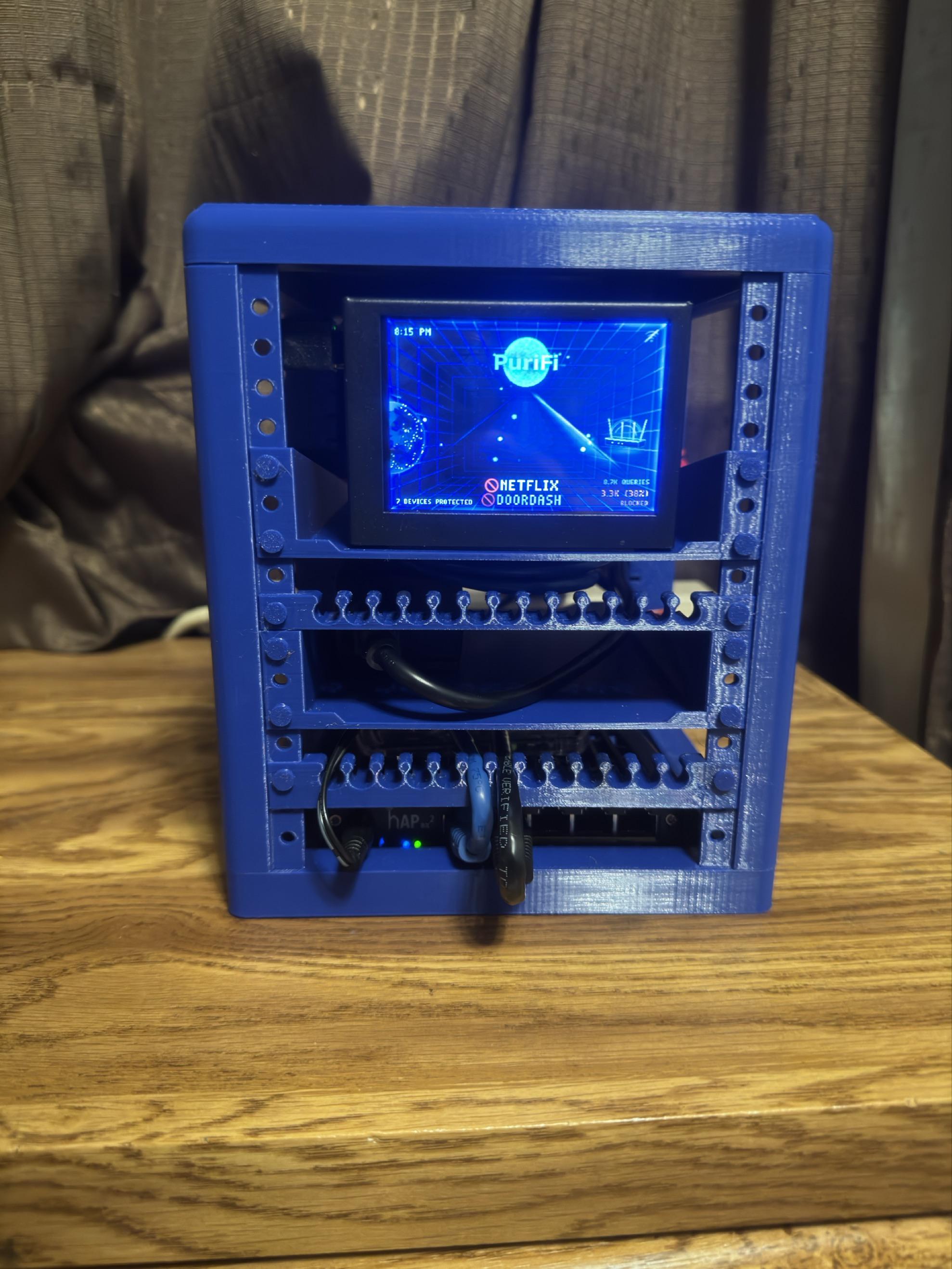
r/homelab • u/Which_Employment_306 • 6h ago
3D files (not my design): https://makerworld.com/en/models/1045362-rack-server-mini?from=recommend#profileId-1031069
This is my first time touching a server rack. I plan to do a major upgrade when I can afford a full-size, 10in rack and additional equipment.
Hardware:
-ISP rental router
-PuriFi (PiHole/Firewall-type device)
-Modem
r/homelab • u/Crutch_Media • 1h ago
Well if any of you guys remember the last time I posted in this subreddit (hard to believe that was over a year ago now) I was working with a raspberry pi 5 based NAS plugged into my homes router. Now though, I have moved and acquired new networking gear and a new server! The server is a standard HP tower Z2 with 32GB of ddr4 and a 10th gen Intel Core i9. I threw in the three 2TB Crucial drives from my pi 5 based NAS in stripe for a total usable capacity of 5.46TB.
The server currently runs openmediavault, although I am looking at other possible OS’ that I could use for a bit more freedom. It also runs docker, with portainer to manage the containers. The server at this current time is mostly used as an ISO repository.
The server is connected to my mini rack which has a BrosTrend S1-V2 2.5Gb switch, as well as a ubiquiti 8 port 1Gb POE switch (there is another switch in there but it is currently unpowered and unused). Connected to the POE switch is actually the Pi 5 from my original NAS with a POE hat to power it. The Pi 5 now runs OpenWRT and acts as the router for the setup. There is also space for another Pi 5 down the road which will likely be used for PiHole, an email server, a VPN server, or a Git repository.
Eventually the two Gb switches will be upgraded to 2.5Gb switches as I am a filmmaker and deal with large video files being accessed from my NAS. It has been fine for now, but 2.5Gb networking will definitely improve my efficiency.
If there’s anything you guys think I should change, just let me know! Also feel free to reach out with any questions you have.
Edit: Forgot to mention, almost everything pictured here (including the server) was given to me for free… I don’t know how I managed to pull that off either…
Hey r/homelab,
I spent the last few weeks rebuilding my media server, and drew the result. Everything runs on a single N100 mini-ITX board with Debian and Docker Compose, plus a small Proxmox box on the side for monitoring and DNS.
The short version
Things that bit me along the way — maybe useful to someone:
forwardedHeaders.trustedIPs), so the logs show real visitor IPs.sniStrict: true in Traefik: scanners hitting the bare IP now fail at the TLS handshake, instead of getting a 404 and a certificate that can reveal your domain.The one piece I'm building myself: file browser app
A small file browser for the media library, in the spirit of an old Apache directory listing but modern: browse folders, then download through short-lived signed links instead of exposing the files directly. You can grab a single file, a ZIP, a list for download managers like JDownloader, or share a whole folder for a limited time. It reads identity and roles straight from Pangolin's headers, so admins can rename and delete while family can only browse and download. It runs as two containers from the same image: one with read-write access behind SSO, and a separate, read-only one that serves the actual downloads. So the only part exposed without a login can never modify anything. I made this because all the other similar solutions wouldn't fit my needs.
Still on the list: a dead-man's switch for when the whole house goes offline, and an off-site copy of the backups.
Happy to answer questions!
r/homelab • u/dj_milan12 • 14h ago
My Mini 7U 10-Inch Homelab
Here’s my little 7U, 10-inch homelab! It’s a compact setup built around a few small servers, Apple devices, and some 3D-printed parts.
The setup:
Servers: Dell Wyse 3040 and Dell Wyse 5070
Apple devices: Apple AirPort Express (2nd gen), used as an AirPlay receiver, and Apple TV (3rd gen), also used for AirPlay
Networking: An 8-port Gigabit Easy Smart Switch and a 5-port Easy Smart Switch
Storage and accessories: A drawer for HDDs, adapters, remotes, and other miscellaneous bits
Cable management: Custom mounts and cable management to keep everything neat and compact
The rack and several of its parts are 3D-printed, making it a fun little project that fits into a surprisingly small space.
If anyone has questions or wants any of the STL files I used, feel free to contact me!
Hope you like my little homelab!
r/homelab • u/Funbunz44 • 1d ago
Alright ladies and gentlemen, I did not think this through when getting a 3-400ish lbs, 42U server rack from Marketplace to put 2 older gen servers, switch, patch panel, etc. into it. I got a great deal so I just ran with it and now live with the consequences lol.
The dilema is this: Im moving to a second story apartment in 2-3 weeks and have to decide, do I drag this 42U server rack out of my apartment, into a truck, and up a flight of stairs to the new home. Or do I sell it, get a 20-24U rack as Im only using 14U right now anyway and work with that. Or third option, sell the 42U, sell the older servers that use alot of power and are noisy, and just settle with a mini 10inch rack or regular desktop I can put Truenas onto.
I really only use them for a handful of apps such as Homebox, Jellyfin and Arr-Suite for me and friends, Sure budget, dockge, jellystat, and a few other lightweight containers/apps. All of that is on a Dell PowerEdge R710 that I got for $100, and I have a HP Proliant DL120 Gen 9 for Proxmox. Ill take any and all opinions and options, my main concern for bringing the 42U with me is the possibility of it falling through the floor, and the landlord just not loving me bringing that in.
Photos so you can see the beast.
r/homelab • u/Temporary_Mobile3877 • 16h ago
This lil rack was made from an old full sized server rack, I used the rails and welded it together, came out okay. I’m running Proxmox and running an old raspberry pi that is running pi-hole. Most likely invest in an additional newer raspberry pi and a Poe switch, I already have some hotswap bays coming so I can upgrade the hard drive bay.
r/homelab • u/FishMonkeyCow • 1d ago
Finally making some progress on my new 1u Incus homebuild
Put together parts I had laying around + some cheap finds on hks version of marketplace + some amazon purchases to round it out.
Only had 1u of space available in my 12u home rack so forced to use a small form factor. Would have preferred to use a 2u but oh well. Have to make the most of what is available.
Will streamline the cables a bit more by the psu once I install the 2 x ssd's.
Radiator fans are a little wonky due to the chassis screws but at least it fits. Zip-ties add to it. :)
Hardware:
-Chassis - Silverstone Technology RM100 1U Rackmount Server Chassis with ATX Motherboard
-PSU - Silverstone Technology FX350-G-VT Flex ATX 1U 350 Watt 80 Plus Gold Power Supply
-Air Flow - 5 x Noctua NF-A4x20 PWM
-CPU cooler - DYNATRON 1U CPU Server Water Cooled Radiator. I did get the Dynatron A18 1U Active PWM Blower first but it was like a jet so I switched to a water cooler based on a post I saw on reddit for 1u builds.
-CPU - AMD Ryzen 7 5700X
-MOBO - ASUS TUF GAMING B550M-PLUS. Chopped off part of the heatsink so It would fit in this chassis. Its ugly but it works.
-MEM - 64gb ddr4
-NETWORKING - 2.5gbe
-Storage - 1 x 500gb nvme for OS, 1 x 1tb for the containers/vms/appdata
-It boots to bios, the lid on top closes and temps are around 50C idle.
Next steps:
-Install 2 x intel enterprise 2tb ssd's for the containers/vms data/logging/telemetry. Need to take them from my gf's nas first.
-Install a nvme heat sink for the 1 exposed drive.
-Install Incusos and the services I want to try.
What I'm thinking to try:
-Incusos - Plan is to use code-server to write the infrastructure code, Gitea to version it, Semaphore to run the automation, and authentik for SSO/MFA. Aiming for a repeatable, code-driven setup rather than lots of manual configuration. We’ll see how it goes, will be the first time using Incus. Curious to see how it performs compared to my experiences in the homelab with proxmox, unraid and truenas. :)
-Wazuh, edr/xdr. Keen to see how this works and compares to mde/crowdstrike/PAcortex/sentinel.
-Security Onion, just heard others use this so wrote it down to spin it up and learn where it fits and its uses.
-Greenbone/Openvas, cve scanning and maybe cis benchmark scanning also if its supported.
-Sigwood, just saw it on reddit a week back. Sounds good so will give it a try.
If you have any suggestions on my plan or security tools/services/platforms I should add to the above stacks/give a try I'm all ears :)
r/homelab • u/DragonflyEven377 • 10h ago
I see a lot of people most commonly using the UGREEN two and four bay NAS, but they are expensive even used. Any cheaper alternatives? What has been reliable for you? Thanks!
r/homelab • u/Zakpatat712 • 17h ago
I'm looking for an node to run local llm's in my 10" rack.
Are there any alternatives to a mac mini comparing the space and price?
I never owned a mac and not looking to get my first one because of this side project.
I want to do some small image generation and coding assistance in my vscode.
Would also be pretty sick to hook it to Hermes and Home Assistant.
r/homelab • u/ThowZzy • 21h ago
I finally upgraded my home rack with a second hand UPS that was a steal (apc 1500va). So I am sharing the current state of my home rack so far!
If anyone is interested I can share more details about it like power draw and on-battery runtime, custom pc specs, softwares running, network diagram…
r/homelab • u/dieaready • 3h ago
I already am running a truenas scale setup running in a jonsbo N3, 5600g/32gb ram with mirrored boot nvme drives (500gb), a mirrored sata ssd apps pool (500gb) and a mirrored hdd storage pool (12tb). I have been thinking of exploring hexOS (bought the licence early but not tried it yet) and am thinking of tweaking how I have my hardware setup as well.
Basically, the os is installed in the nvmes on the motherboard and apps are in the sata ssds in the hotswap bays. I've been thinking of switching them around so the OS is in the sata ssds (allowing me to swap boot media physically) and give the better nvmes to the app pool to use. Would this be a good idea?
Also toying with the idea of externally swappable boot drives for a test rig in a N2 so I can physically swap between different OS. I have spare sata ssds and nvmes bought before the price hikes so I'm not going out to buy, but on the hardware/software side, would there be any potential issues?
r/homelab • u/Suspicious_Use218 • 23m ago
Hello,
I am recently becoming interested in setting up my own homelab. I would like to ask the community on what are they checking whenever they purchase used hardware, such as used servers, ram, disks, etc. in order to trust the purchase and consider it to be working.
Any advice will be welcome. I know about memtest, but are you doing something else?
Thank you!
r/homelab • u/SnooHabits9636 • 14h ago
Hello all, hoping for some help! I am setting up a homelab with the best equipment I have, an “free” old gaming pc (figured this is better than spending money on a new setup). I recently came across these hard drives at an estate sale and picked them up for a whopping $2. I confirmed they were wiped at pickup.
From what I can tell, these things are pretty old (7 Seagate 7200.10 and 2 7200.12). I want to see if it’s worth it to try and use this as a storage solution with a lot of parity/backup, or if they’ll be too risky with their age. If so, I do want to know if it’s okay to use a jbod/acrylic case solution to house these outside of the pc case and connect via SATA? I’m not sure if I could squeeze in one or two drives in the case, unfortunately the bottom port is full with the psu and leftover storage for the pc. Still new to this so please call out any errors of my assumptions on my end.
I was able to start a Jellyfin library on the old pc hdd, but I did so while it is still on windows and need to migrate to ubuntu soon (and set up/learn about docker to my understanding).
Thanks, all!
r/homelab • u/MaxLin_ • 11h ago
How do you organise everything?
So I’ve fallen into the trap of spreading myself over too many things and I find myself getting lost.
Some stuff on physical noteooks, some stuff on obsidian, some on Bowser saved link, some saved TikTok videos, some saved YouTube videos, reddit saved, etc. Different work teams chats, appointments on Google calendar, files on Google drive + hard drive + Nas + Onedrive, notes in a physical notebook etc, homelab flows, undrawn diagram on my mind, test done, failed implementation, keys, etc etc
How have you brought everything together? I dunno if I’m burnt out or flooded with too many things in mind but for some reason my brain can’t keep up with where everything is, so I would love to hear any tips you have for organising everything in a way that is sustainable. Thank you!
Tl;dr what’s your setup for managing all your notes, tasks, to-dos, information, databases etc