r/linux_gaming • u/lajka30 • 8h ago
wine/proton VKD3D-Proton 3.1 Released With New Features Ahead Of Big v3.2 Release
303
Upvotes
r/linux_gaming • u/monolalia • Sep 01 '26
Welcome to the newbie advice thread!
If you’ve read the FAQ and still have questions like “Should I switch to Linux?”, “Which distro should I install?”, or “Which desktop environment is best for gaming?”, this is where to ask them.
Alternatively, try r/linux4noobs and r/linuxquestions: both are active subreddits supporting new Linux users.
Please sort by “new” so new questions can get a chance to be seen.
The previous thread is here: https://www.reddit.com/r/linux_gaming/comments/1ukoung/getting_started_the_monthlyish_newbie_advice/
r/linux_gaming • u/monolalia • May 18 '26
Here’s a link to this subreddit’s FAQ document (which attempts to answer many common questions).
This thread is not meant for asking frequently asked questions. There is a pinned monthly-ish “Getting Started” thread for those.
You can post suggestions for improvement below, though! Just please explain what you’re talking about. The number of FAQ editors has been 1 (one) for a while now, and that one’s a dummy that doesn’t use 95% of the fancy gaming stuff y’all do.
Reposted as an Old Reddit link because New Reddit, in addition to being generally confusing, does not display the table of contents.
r/linux_gaming • u/lajka30 • 8h ago
r/linux_gaming • u/ADBR12 • 36m ago
r/linux_gaming • u/Mercy--Main • 36m ago
takes a few minutes, it's annoying
r/linux_gaming • u/Barafu • 11h ago
Right now, Windows gamers are all discussing a free program SCSKiller. From reading the description, it seems the program does exactly the same as what Steam shader precompilation does on Linux. It compiles game shaders out of the game and places the results into the GPU driver's cache.
Serious Youtube channels made tests and report huge improvements in low1% FPS in some games that are prone to stutters, while no effect on others. For example, Borderlands, Final Fantasy, Jedi Survivor.
Also, the AMD GPU driver for Windows has silently included the same functionality for a whitelist of games and didn't even tell.
Meanwhile, we on Linux routinely tell people to disable this option in Steam. Bazzite documentation tells to disable it, and Cachy forums too. I myself told people to disable it because the documentation says so. But now I have
Questions:
r/linux_gaming • u/WayfarerDuex • 27m ago
I realize it's not officially released yet, but anyone played beta on linux yet? Interested in whether it's running on Steam/Proton (yes, I know it's not a Steam game, but it can be added to Steam as a non-Steam game).
r/linux_gaming • u/Complex_Aide4242 • 2h ago
This is a video I have made with several games that show the current progress of the NVK driver. This is currently using nouveau as nova is not released to the public yet but the performance for the open source driver seems to be strong in certain areas, such as in minecraft and dungeons 1, which the opensource driver has only a 20% gap. Newer and heavier games such as Deadlock and War thunder still have a large gap, from 44 to 70%, but it is hopefully going to improve in the future.
r/linux_gaming • u/FIJIWaterGuy • 4h ago
Does anyone know if an updated Arch Linux system running the latest Proton Experimental has all of the pieces for the NVIDIA DX12 performance fix to work out of the box? Are any custom pieces like Proton GE or special command line parameters required at this point? It would also be handy if anyone knows a way to confirm that it's working in game (not just checking vulkan extensions available from the driver).
It might be helpful to others to give the status for other distros if you know it.
r/linux_gaming • u/psunai • 17h ago
They announced support a while ago, you can test it by going to https://play.roblox.com/games/start?placeId=URPLACEID <- put your placeID or wait for it load and click a game you own!
r/linux_gaming • u/anh0516 • 5h ago
r/linux_gaming • u/Holiday_Reference_41 • 3h ago
Hey everyone.
I've been working on x1SteamOS / Enigma, an experimental project to bring a modern Linux kernel to the Nintendo Switch Lite (Mariko / Tegra X1+).
I started this because I wanted to see how far I could push this hardware beyond the older L4T kernel. What began as an experiment turned into weeks of kernel debugging, hardware testing, driver issues, failed boots, and countless rebuilds.
And I actually got somewhere.
What currently works:
- Linux 6.18 boots on a real Nintendo Switch Lite.
- ARM64 userspace runs.
- USB gadget networking and SSH work.
- Nouveau detects and initializes GPU/DRM devices.
- The kernel patches, configurations, technical findings, and documentation are publicly available.
What's still broken:
- PCIe link training fails, preventing the onboard Broadcom Wi-Fi from working.
- Nouveau/Mesa hardware rendering crashes during OpenGL operations.
- KDE/Wayland isn't stable yet.
- There's still significant work required before this becomes a usable Linux distribution.
I have a new experimental kernel revision prepared, but it hasn't been tested on hardware yet.
Here's the difficult part.
I'm one person. I've spent a huge amount of time trying to make this work, and I've reached a point where I simply don't have the energy to keep pushing it forward alone.
I'm exhausted.
I don't want to quietly abandon the project, especially after getting this far. I would rather open it up and give other developers the opportunity to continue the work.
I'm looking for people interested in Linux kernel development, NVIDIA Tegra, PCIe, Nouveau/Mesa, ARM64, or even just testing and documenting things.
You don't need to take on the whole project. Individual fixes, code reviews, debugging ideas, and pull requests would already mean a lot.
I'm also open to finding co-maintainers or someone willing to take a larger role in the project's future.
I've tried to make the repository reproducible and document the current problems so nobody has to start from zero.
GitHub: https://github.com/Garyu-tt/x1SteamOS
This is not a ready-to-install distribution. It's experimental kernel development, and anyone testing it should preserve their working recovery setup.
I can't promise constant development, quick responses, or continuous hardware testing anymore. But the code and research are there for anyone interested in continuing.
I still believe this little machine has more potential than we've managed to unlock.
I just don't want all this work to end because one developer ran out of energy.
Thanks for reading.
r/linux_gaming • u/softPuddingzz • 18h ago
Honestly, one of the coolest things about Linux gaming is seeing older games run on systems they were never meant to support.
Between Proton, Wine, and community fixes, games that seemed abandoned or impossible to get working can suddenly become playable again. Sometimes you don't even need an official Linux port.
Sure, some games still take way too much tinkering to get running, but there's something satisfying about finally launching a game you thought you'd never get working.
It's also nice knowing that these games aren't necessarily lost just because the original developers stopped supporting them.
r/linux_gaming • u/Son_Goku00mkj • 59m ago
hello everyone
now we have fsr4 vulkan and in linux fsr was working great didn't compare it to windows but when i had rdn2 card fsr4 on RDR2 was so bad on dx12 and it crashed on vulkan
so now we have it native will it be better on linux that proton will not have to translate it from dx12 to vulkan or it will effect nothing
r/linux_gaming • u/mr_MADAFAKA • 1d ago
r/linux_gaming • u/Liam-DGOL • 7h ago
r/linux_gaming • u/Ok_Eagle_2823 • 30m ago
r/linux_gaming • u/AgentAnonymous7 • 2h ago
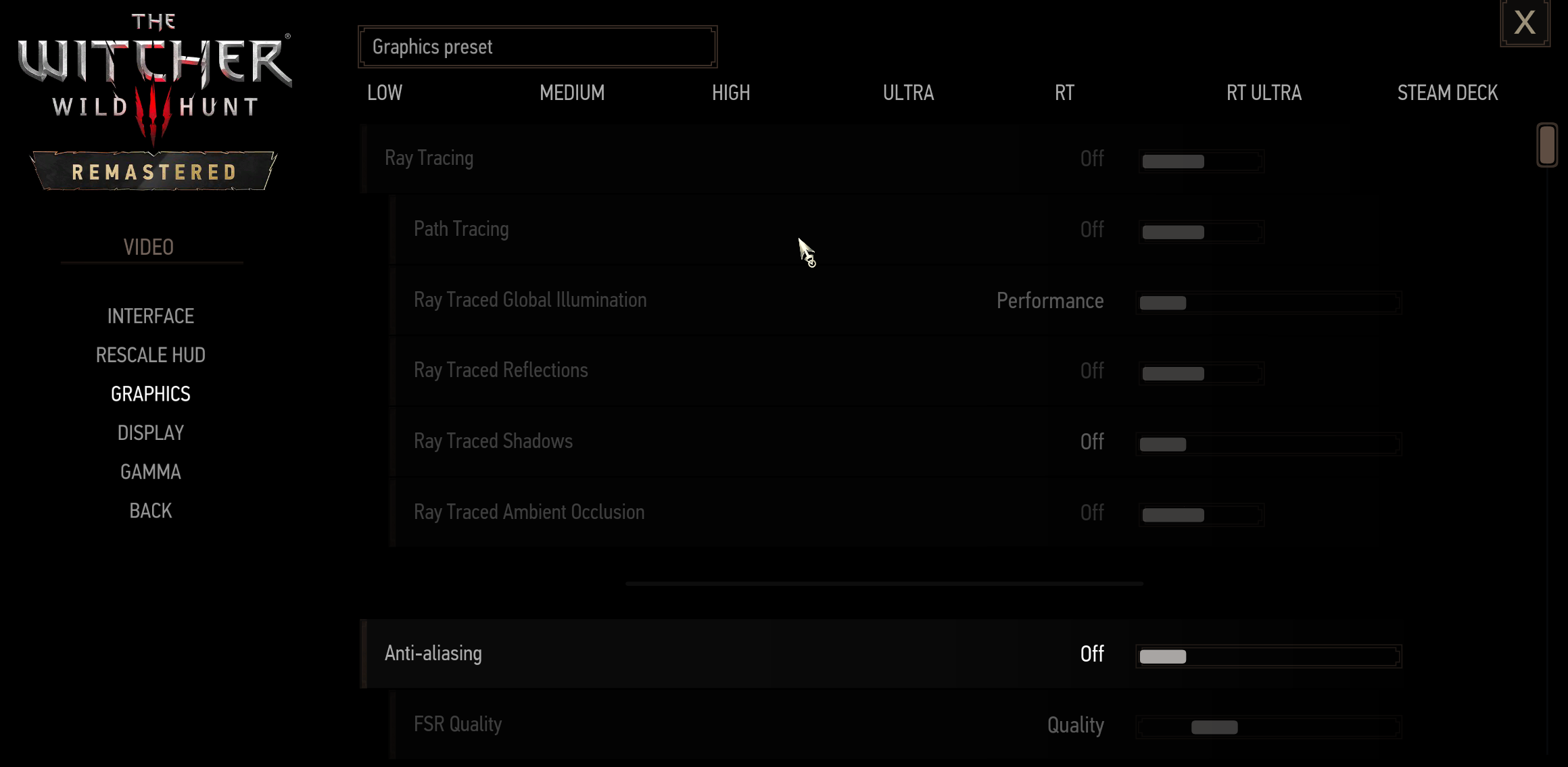
I am not able to use Ray Tracing and FSR 4 in Games, the options are grayed out. I am using following versions and Hardware. Well I only tried two games so far Cyberpunk 2077 and Witcher 3 but I guess it will same case in other games. So what should I do to enable it and if there is anything else I should do to get most out of hardware please let me know.
Software:
OS : Ubuntu 26.04.1 LTS
Kernel : 7.0.0-38
Driver : Mesa 26.2.5 - kisak-mesa PPA
Steam Compatibility: Proton Experimental and also tried Proton GE Latest
Hardware :
Cpu : Ryzen 7 9700x
Ram : 16GB 6000MTs
GPU : AsRock Challenger 9070 16GB
r/linux_gaming • u/cordipickle • 1h ago
r/linux_gaming • u/QuirkyArtichoke2396 • 1d ago
Here's my hardware setup:
PC Hardware:
- CPU: AMD Ryzen 7 9800X3D
- RAM: KLEVV CRAS V 32 GB (2x16 GB) DDR5 6000 MHz CL30 Dual Channel
- Motherboard: MSI PRO B650-A WIFI
- SSD: Samsung 990 PRO 1 TB
- GPU: Sapphire NITRO+ AMD Radeon RX 9070 XT
- PSU: MSI MPG A1000G PCIE5.1 1000W 80+ Gold
- CPU Cooler: MSI MAG CORELIQUID E360 360mm AIO
- Case: MSI MAG FORGE 320R AIRFLOW
Peripherals:
- Monitor: ASUS ROG Strix XG27ACS 27"
- Keyboard: Attack Shark X68 HE Magnetic Keyboard
- Mouse: Attack Shark X11
- Headphones: Soundcore Q21i NC
I've been using CachyOS as my only operating system since March. I mainly play Cyberpunk 2077 and CS2 Premier, along with the usual web browsing and everyday desktop activities.
As you probably know, many online games still don't work on Linux, and FACEIT isn't supported either.
I'm curious: are there other people here with relatively high-end hardware who use Linux as their sole operating system?
Do you ever feel like your hardware's potential is going to waste because you're using Linux? By that, I don't mean Linux itself wasting system resources. I mean things like the smaller game library compared to Windows and not being able to take full advantage of every feature of your hardware in the same way you could on Windows.
I'd also love to hear your thoughts on this.
As for why I switched: I wanted to move away from proprietary software and embrace open source. As a software developer, I also really enjoy being able to do almost everything through the terminal. I love the modularity of Linux distributions, their package management systems, and the way updates are handled. It just feels like a proper developer environment.
Another reason was my experience with Windows. Windows Update kept downgrading my GPU drivers for some ridiculous reason, no matter what I tried. I was also experiencing LiveKernelEvent errors, which contributed to my decision to switch.
Ultimately, I'm interested in hearing about other users with similar setups: what hardware do you have, which distribution are you running, what do you use your system for, and how do you feel about gaming and hardware support on Linux?
I thought this could be a nice place to share experiences and have a discussion!
r/linux_gaming • u/Xcaliber02 • 38m ago
Hey everyone,
I'm a developer thinking about moving away from Windows. I'm tired of the bloat, and I'd like a cleaner system for daily work.
My setup:
- Laptop: Gigabyte GX6
- RAM: 16 GB
- GPU: RTX 4050 (hybrid graphics)
- Storage: 500 GB
What I do: development work, plus I mostly play single-player games (no competitive/anti-cheat stuff).
I've already booted Pop!_OS 24.04 from a USB live session. It has the NVIDIA-specific ISO, which is a big reason I'm leaning toward it. I'm planning to dual boot (roughly 200-250 GB for Pop!_OS) so I can keep Windows as a fallback.
My questions:
Is Pop!_OS a good pick for this laptop, or would another distro suit it better?
How is the NVIDIA hybrid graphics experience on laptops (battery, switching modes, external monitors)?
How well do single-player games run through Steam/Proton compared to Windows?
Any known issues with Gigabyte laptops specifically (fans, keyboard lighting, function keys, suspend)?
Is dual booting the right call, or would you go all in on Linux?
What would u do if u are in my place
Thanks, any real-world experience is appreciated!
r/linux_gaming • u/QuiltraFea • 1h ago
r/linux_gaming • u/Same-Leadership1630 • 7h ago
I'm on Linux and since i pre registered for AVA Rebirth i decided to try it by installing Lutris then installing the VFUN Launcher like this but when i installed the game it gave me the error in the image because of the AC that the game uses. Is there any way to get it working or do i have to contact Valofe to try and get them to get the game working on Linux? If so, how do i contact them?
Processing img w5ipzel397yh1...
r/linux_gaming • u/Serious-Ad2423 • 1h ago
System information
OS: CachyOS Linux
Desktop environment: Hyprland (Wayland)
CPU: Intel Core i5, 13th generation
GPU: Intel Iris Xe integrated graphics
GPU platform reported by the kernel: ALDERLAKE_P
GPU PCI ID: 8086:a7a1
Kernel: 7.3.0-4-cachyos
Mesa: 3:26.2.5-1 (CachyOS v3 build before the downgrade)
Intel Vulkan driver: vulkan-intel 3:26.2.5-1 before the downgrade
Vulkan API version reported by the system: 1.4.363
Steam: Native Linux client
Game: Counter-Strike 2, native Linux version
Problem description
Hi everyone,
I am experiencing repeated Counter-Strike 2 crashes on CachyOS Linux with Intel Iris Xe integrated graphics.
The game can launch successfully and enter a match, but it eventually crashes during gameplay. The issue is not simply low FPS or stuttering: the game actually crashes, and the kernel logs indicate that the GPU hangs while CS2 is running.
The relevant kernel messages include:
Fence expiration time out i915-0000:00:02.0:cs2[3482]:c46!
GPU HANG: ecode 12:1:849ff6f1, in cs2 [3482]
cs2 context reset due to GPU hang
The GPU hang occurred repeatedly during gameplay.
The kernel identifies the graphics platform as ALDERLAKE_P, and the active process at the time of the error is cs2.
I have not yet determined whether the root cause is an Intel ANV Vulkan driver bug, a Mesa regression, an i915 kernel driver issue, or an interaction between the game and the graphics stack.
Troubleshooting attempts
I have tested several environment variables through Steam's launch options.
This appears to prevent the crashes, or at least significantly reduce their occurrence, in my testing.
However, it causes severe lag and a substantial performance reduction, making the game practically unplayable.
The game launches but eventually crashes during gameplay.
The game still crashes during gameplay.
The game runs for a short time but eventually crashes again.
None of these options provides a usable, stable solution.
The fact that INTEL_DEBUG=stall changes the behavior is interesting, but I do not know whether it points to a synchronization issue, a driver bug, or something else.
Mesa downgrade experiment
Someone suggested testing an older Mesa release to determine whether the issue might be a regression.
My original Mesa version was:
mesa 3:26.2.5-1
vulkan-intel 3:26.2.5-1
I then downgraded Mesa to 26.0.3, following the suggestion, but CS2 continued to crash.
Therefore, downgrading to Mesa 26.0.3 did not resolve the problem on my system.
I would prefer to identify the underlying cause rather than continue downgrading packages without evidence of a reliable fix.
Additional GPU information
The GPU error report contains the following information:
Platform: ALDERLAKE_P
Driver: i915
PCI ID: 0xa7a1
Firmware information reported by the system:
DMC: adlp_dmc.bin, version 2.20
GuC: adlp_guc_70.bin, version 70.49.4
HuC: tgl_huc.bin, version 7.9.3
HuC authentication: successful
The kernel logs show repeated GPU hangs and context resets involving CS2.
What I am trying to determine
I would appreciate advice from anyone familiar with Intel integrated graphics, Mesa, ANV, and the Linux kernel graphics stack.
Specifically:
Has anyone experienced similar CS2 crashes with Intel Iris Xe graphics on recent Mesa releases?
Is there a known issue involving i915, ANV, or GPU command submission that could explain these hangs?
Could the behavior of INTEL_DEBUG=stall help narrow down the cause?
Are there specific kernel logs, GPU error-state details, or Vulkan diagnostics I should collect?
Is there a known fix that does not require permanently using an older Mesa version or sacrificing a large amount of performance?
I am not looking for random launch options to try. I would like to diagnose the problem systematically and determine which component is responsible.
If anyone has experienced the same issue on Intel Iris Xe, Alder Lake-P, or Raptor Lake-P, I would be grateful for any information about a confirmed fix or useful debugging procedure.
Thanks!