r/SteamDeck • • 6h ago

Discussion Steam deck paralysis

263 Upvotes

Anybody else getting steam deck gaming Paralysis, every time I fancy playing on it sat on the sofa, I just spend 10min looking at my installed games, then my library, look at my emulators…. Then close it down and put it back away. Then if I find something I feel like I’m forcing myself to try something I give up after a few minutes not really getting invested into it.

I’ve had my steam deck for 3 years now. Loved it at the start. But for the last 18 months I doubt I’ve played a total of 1 hour in actual games in it.

Gaming isn’t the issue, when I’m at my parents with my PC (my partner doesn’t have space for a PC in her small apartment) I can spend hours on it.
r/SteamDeck • • 21h ago

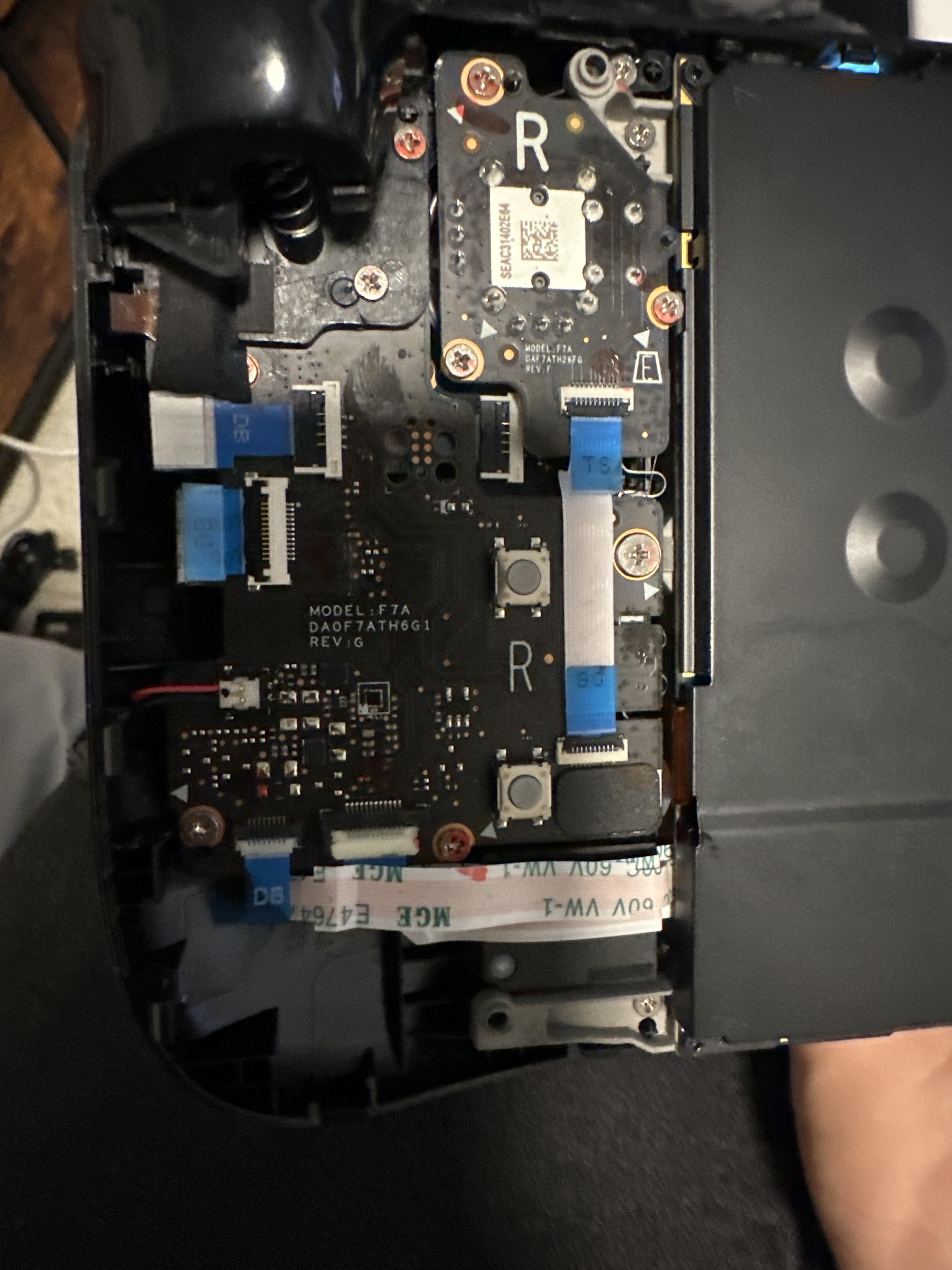
Hardware Repair After 800+ hours of Fallout 3 and NV my R button finally gave out

Post image
147 Upvotes

Hey guys, so after 3 years of everyday use my R button gave out and I was wondering if I should take it to a repair shop or just buy the daughter board online and replace it myself and what would be the best place to find that daughter board (I’m balling on a budget)


r/SteamDeck • • 18h ago


Question Witcher 3 black sun

Post image
116 Upvotes

Hi everyone, I am attaching an image, in TW3 remastered why sun is looking like this:


r/SteamDeck • • 7h ago

Tech Support Distance of finger from touchscreen point

Enable HLS to view with audio, or disable this notification

77 Upvotes

Is there a way to fix the screen touch distance problem

Even though I use the touchpad sometimes in other games for the cursor and touch screen the distance is quite far so it's difficult to press it.


r/SteamDeck • • 2h ago

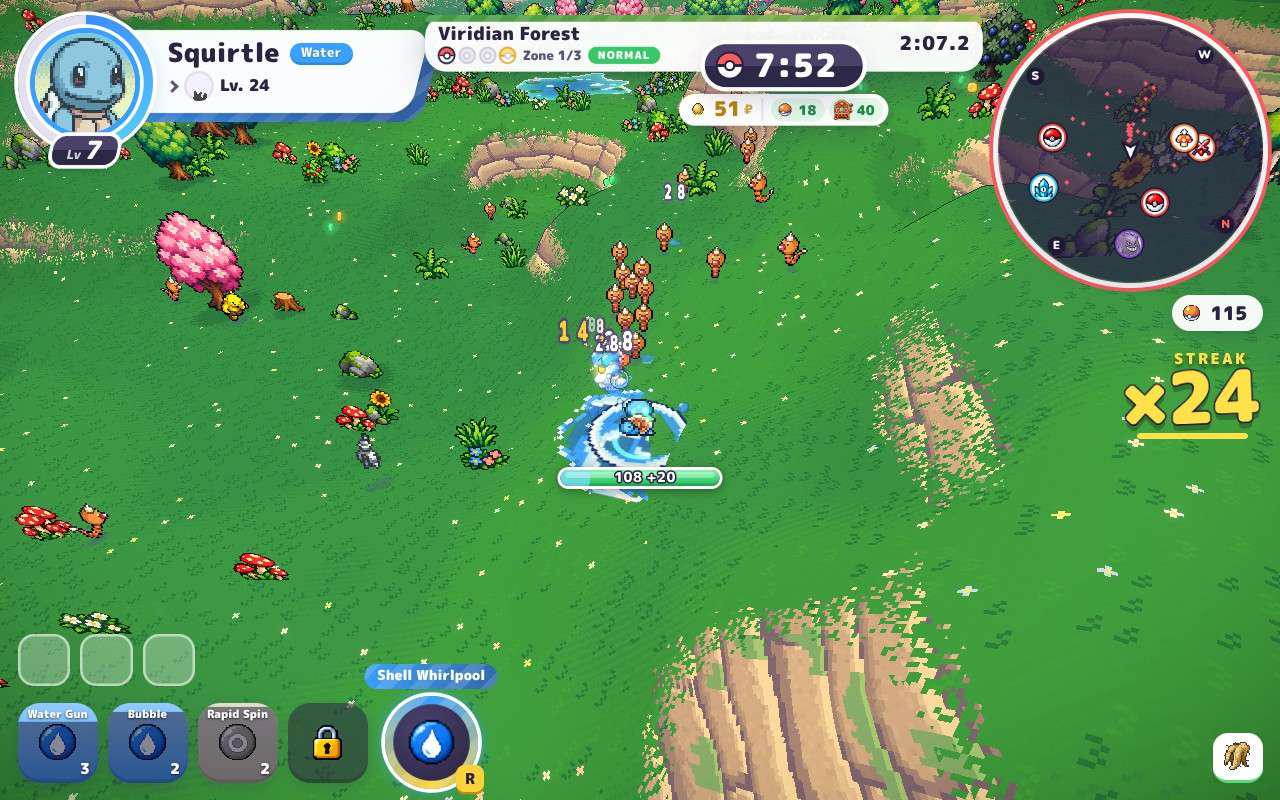
Guide How to Play PokeBonk on Steam Deck [GUIDE]

Post image
61 Upvotes

How to Play PokeBonk on Steam Deck

I managed to get PokeBonk running on the Steam Deck, and it's fully playable!

Here's a step-by-step guide on how to set it up.

1. Set up Firefox in Desktop Mode

  1. Switch your Steam Deck to Desktop Mode.
  2. Add Mozilla Firefox to Steam using the Add to Steam option.
  3. Open Mozilla Firefox and type about:config into the address bar.
  4. Click Accept the Risk and Continue if the warning message appears.

Disable the fullscreen warning

  1. Search for full-screen-api.warning.timeout in the search box.
  2. Click the pencil icon to edit the value.
  3. Change the value from 3000 (3 seconds) to 0.
  4. Search for full-screen-api.warning.delay.
  5. Click the pencil icon to edit the value.
  6. Change the value to -1.

Disable the pointer lock warning

  1. Search for pointer-lock-api.warning.timeout.
  2. Double-click the preference and change its value to 0.

2. Configure Firefox in Gaming Mode

  1. Switch back to Gaming Mode.
  2. Find Mozilla Firefox in your Steam library.
  3. Open Properties and go to Launch Options.
  4. Replace the existing launch options with the following:

text

"run" "--branch=stable" "--arch=x86_64" "--command=firefox" "--file-forwarding" "org.mozilla.firefox" "@@u" "@@" "--kiosk" "--url" "https://pokebonk.com/"
  1. Rename the game from Mozilla Firefox to PokeBonk.
  2. Launch the game!

3. Recommended Controller Layout

Press the STEAM button and configure the controls to your liking.

Here's the layout I use:

  • Left Joystick: Joystick (8-way overlap), WASD
  • Right Joystick: Mouse
  • LT: Space
  • LB: Mouse Scroll Down
  • RT: Left Mouse Click
  • RB: Mouse Scroll Up
  • A Button: E (Keyboard)
  • X Button: R (Keyboard)

That's it! You should now be able to play PokeBonk on your Steam Deck.

Have fun! 🎮


r/SteamDeck • • 1h ago

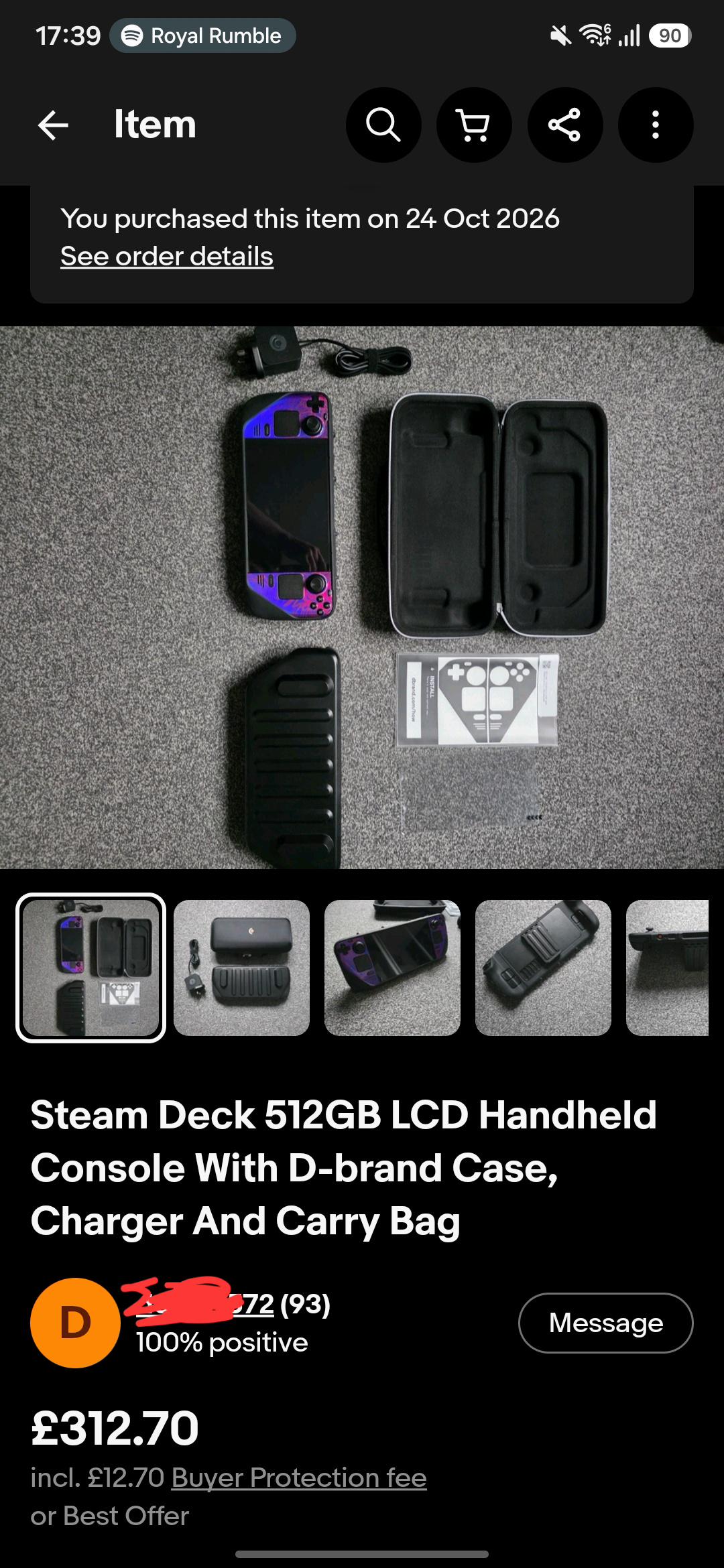
News Deal of the year? Oled for 312??

Post image
• Upvotes

Seller didn't know it was an oled model! 312 for a like new oled model with full dbrand kit is nuts!


r/SteamDeck • • 17h ago

Discussion NeoStation - a beautiful emulation frontend with RetroAchievements support

Thumbnail
gallery
32 Upvotes

I've just found my favorite emulation frontend for SteamDeck. It's called NeoStation - https://neostation.dev/

I wanted to share because I couldn't find any other posts about this frontend on this subreddit. I love it because it looks beautiful and supports RetroAchievements so you can see all your achievements the way it's done on all modern front-ends (PS, Xbox, Steam). It also supports cloud saves and I like it much more then Emulation Station because of these reasons.

I'm not affiliated just enjoying it heaps.

How to make it work on a SteamDeck - https://github.com/misobadev/neostation-frontend#steam-deck


r/SteamDeck • • 23h ago

Tech Support D-pad, X and A buttons stopped working suddenly

Post image
36 Upvotes

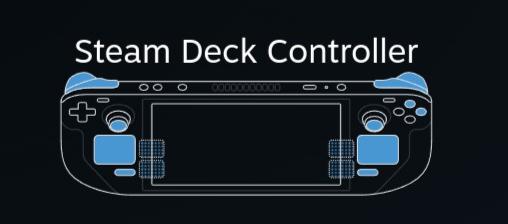
All buttons colored in blue are functioning. This happened recently and I don't know what caused this and what's the solution


r/SteamDeck • • 8h ago

Tech Support I’m guessing this isn’t normal trackpad behaviour?

Enable HLS to view with audio, or disable this notification

14 Upvotes

r/SteamDeck • • 20h ago

Question Restory no longer works on SteamOS!?

Enable HLS to view with audio, or disable this notification

9 Upvotes

So this happened to me today after downloading the new update for Restory and no matter what version of proton I use, the game no longer works on SteamOS now. I feel like I’m the only one on the planet that has this issue, I’m on the latest stable SteamOS update, all my other games load just fine for me so what gives??

EDIT: I figured out what happened. So I was using the old version of LSFG which I don’t have anymore, turns out I forgot to get rid of the launch option for that. When I did that, the game now opens beautifully and works. Thanks for trying to help though, I really appreciate it!!


r/SteamDeck • • 2h ago

Configuration Streaming From a Linux/SteamOS Desktop to Steam Deck, or How I Finally Figured Out How to Match Aspect Ratios

Post image
10 Upvotes

This is probably a better fit for something like r/steamOS, but figured I would share here in case anyone has shared my frustrations around streaming from a 16/9 aspect ratio Linux/SteamOS Desktop to the 16/10 steam deck:

Apparently, Linux is limited in it's ability to swap aspect ratios on the fly in the way that you can do on Windows. So, if your monitor is 16/9 (which will be most everyone), and you stream to your steam deck, you won't have a full screen image when you select a 16/10 resolution (like 800p) in game, even if you have the remote play settings set to 800p. The advanced host setting to change the resolution to match the client isn't even displayed. However, in SteamOS Desktop, I've found a very simple workaround in game mode:

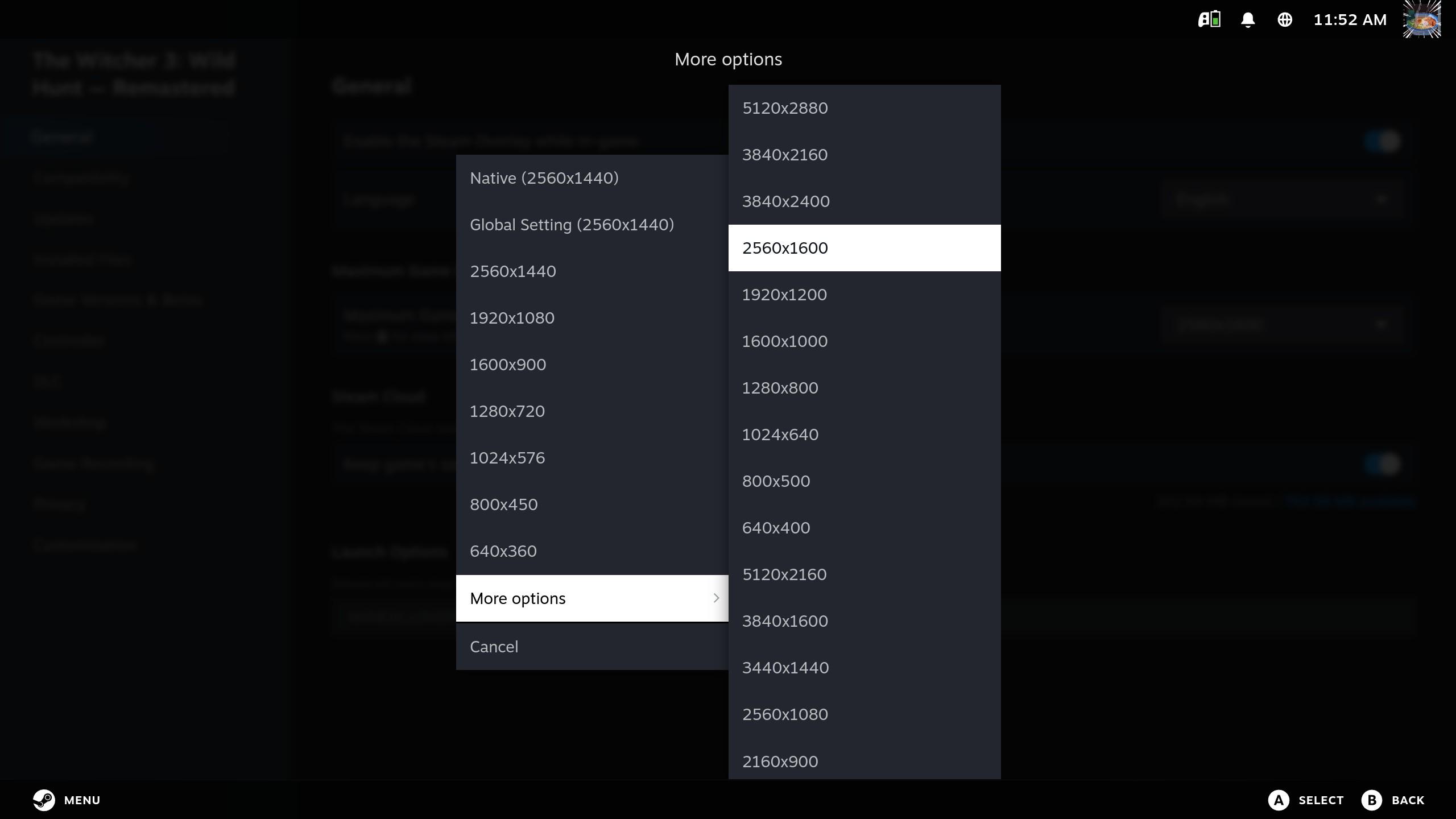
On your desktop: select a game, open the settings cog, then open properties. Select the Maximum Game Resolution setting, scroll to the bottom and open More options, then select a 16/10 resolution. My monitor is 1440p, and I used the 1600p option. Now when you stream your game, you can achieve a 16/10 aspect ratio for glorious fullscreen handheld gaming! I'm betting this would work if you set your global max res setting to 16/10 as well, though I have not tested that, and you would want to set it to a resolution greater than your monitors so that you aren't limiting your desktop experience.


r/SteamDeck • • 6h ago

Tech Support Docked SD + KBM + 1080p monitor - WoW

10 Upvotes

We are going to have a launch lan party with friends for WoW Forever. Game is not accessible right now and wont be before the launch - but besides little bit disappointing performance I noticed one quirk that seem to be somewhat common - when I clicked the mouse to for example move camera (but not related to movement itself) game microstuttered. And it's consistent, if I spam click, game is presentation.
I was doing some updating and testing yesterday on different (accessible) version of WoW - Classic and the same quirk happened there (but performance was amazing, incredible).

I am split on whether to pack main PC which will be PITA or yolo it with SD and hope for best (main rig is too AMD system, CachyOS, no such issues with mouse in neither version of WoW).

Did you guys encountered the click/stutter issue, is there a known fix? I googled and found few rabbit holes with no clear 'fix' unfortunately, however, it looks like this issue is well known for about 2 years.
Other question would be general tips and tricks on performance uplift, although, I understand that new engine and graphics of WoW Forever is probably too much for SD, every bit counts!


r/SteamDeck • • 23h ago

Tech Support Games suddenly freezing after the newest update?

7 Upvotes

After the newest update my steam deck OLED started randomly freezing on games when playing them.

The audio and my inputs are still going through but the screen is just stuck frozen, I can still hit the Steam button and bring up the menus and interface and everything still works just fine on that end.

But the only way I can fix my game is to force exit and relaunch it.

Has this been happening to anyone else? No I don’t have any 3rd party software on my Steam deck and I already went to Steam support and they basically just said that they’ll look into it.


r/SteamDeck • • 5h ago

Question ProtonDB issues

Thumbnail
gallery
5 Upvotes

I am getting this error while trying to register my Steam Deck through ProtonDB. It's the first time I thought I should be helpful since the last post on Lemon Cake was from a year ago and of course it's deciding to punish me for trying to do so 😭

Am I missing something? I am clearly in desktop mode, and I truthfully don't know how to fix this issue. Any help would be greatly appreciated :3


r/SteamDeck • • 8h ago

Question Can I get Minecraft Bedrock on Steam Deck using my Microsoft account?

6 Upvotes

I'm aware there are ways to get it with Google Play, but I don't have it on Google Play and I'm not spending money on a game I already own.


r/SteamDeck • • 16h ago

Tech Support game keeps freezing

6 Upvotes

im trying to play kingdom hearts 2 on my steam deck but the game keeps freezing, i dont have any mods set up, i have zero idea whats going wrong


r/SteamDeck • • 5h ago

Tech Support My battery is toast.

4 Upvotes

Bought my OLED Deck in December 2024.

Yesterday when I turned it off the battery was at 97%, today when I turned it on it was at 40% and drained completely in a matter of minutes. Anyone else here run into something similar?


r/SteamDeck • • 17h ago

Tech Support Can anyone help me figure out what I did wrong here?

Post image
3 Upvotes

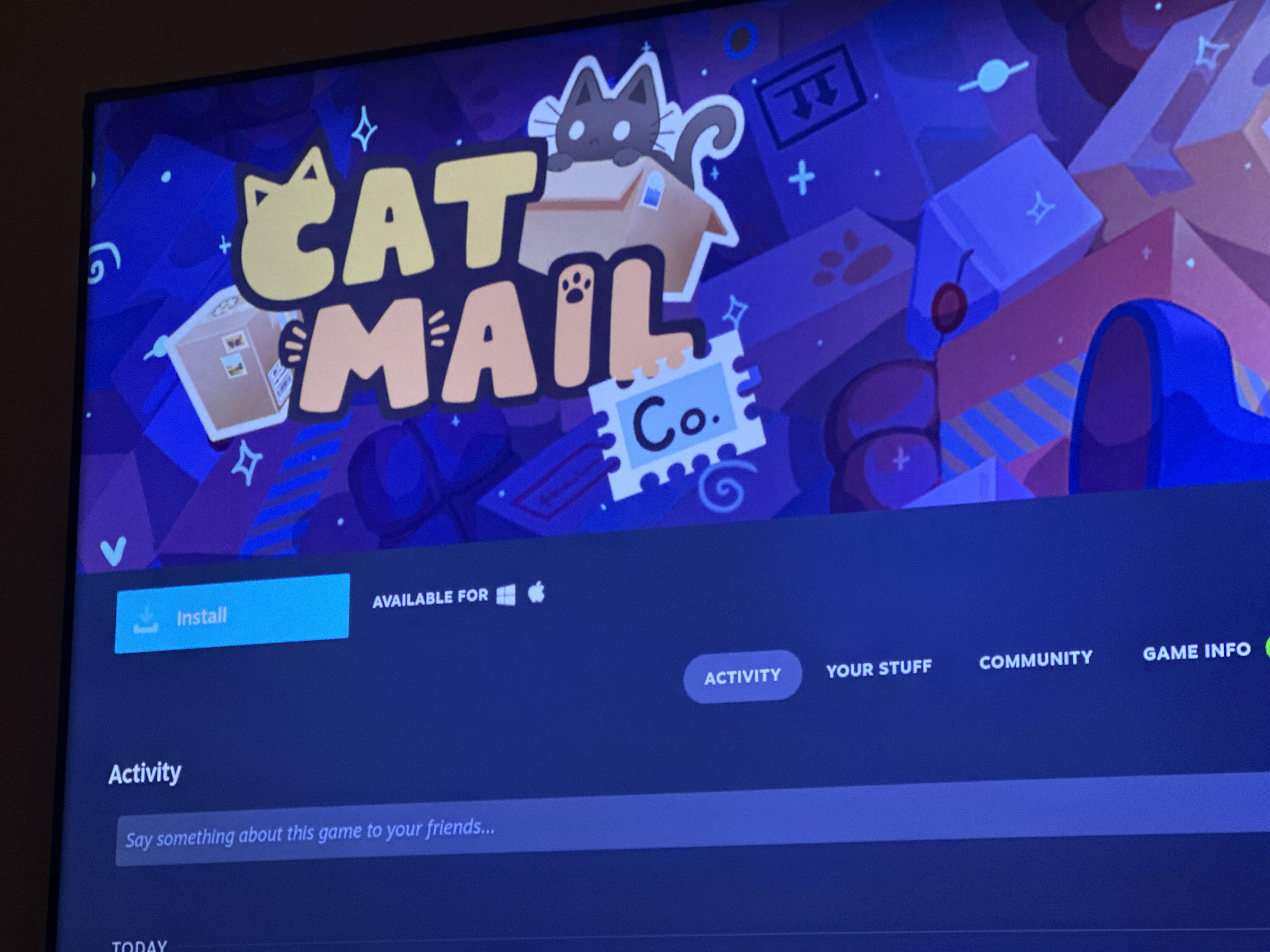
Bought this game that is verified for steam deck. I even played the demo just fine! But now I can’t download it because it says it’s for Microsoft or Apple. Help please! What did I do wrong??


r/SteamDeck • • 18h ago

Question How does Dying Light 2 run on Steam Deck?

5 Upvotes

Hi, I saw the game is on sale and was wondering how well it runs on the Steam Deck during long gaming sessions. I plan to play docked at 720p. Does the console get very hot? Are there a lot of stutters?


r/SteamDeck • • 7h ago

Question Steam deck limited edition white start up

3 Upvotes

Hi I bought a second hand limited edition in white and I don’t have the special start up and keyboard. Any idea how to get it? Thank you


r/SteamDeck • • 13h ago

Tech Support Remote Play Issues

4 Upvotes

Relatively new steam deck user. I have used Xbox and PlayStation remote play on my laptop, phone and Logitech G cloud over the years and had minimal issues with them when it comes to remote play. I have been trying remote play with my steam deck and it seems to lag severely. Xbox remote play barely even works on it and runs super slow and delayed. PlayStation remote play seems better but still not as good as I have had it on other devices. Any advice people have?


r/SteamDeck • • 19h ago

Hardware Repair Steamdeck Warranty

3 Upvotes

I bought a steamdeck from a reseller in South East Asia. However it died on me more than a month later and the reseller didn't cover issues after a month.

I reached out to steam and was told the device is less than a year old and within their warranty period. However Steam referred me to their asia-pac distributor since mine is a unit from them, but the distributor also turned down my repair request since i didn't buy direct from them.

I got it checked with a local repair shop, seems like motherboard damage which they aren't equipped to handle, so it'll be great if anyone can advise on where to repair SD OLED in South East Asia. Thanks!

Ps - if this comes to the attention of Steam, I'd really appreciate some help.


r/SteamDeck • • 20h ago

Question Protocol for lightly used Steam Deck?

3 Upvotes

I tend to go through spurts of use for my OLED deck. I'll play it a lot for a week or two and then put it away for a month or two. When I pick it up again, it's battery is of course drained. Should I be plugging it in so that it stays fully charged all the time? Is letting the battery drain over time bad for it?


r/SteamDeck • • 17h ago

Tech Support NIKKE using Sunshine/Moonlight

2 Upvotes

So I used to consistently stream NIKKE to the deck using S/M with no issues but as of a few months ago the inputs work for like 30 seconds launching game then it just stops working entirely. I haven't changed anything just one day it stopped working.

Similar issue for anyone else or are you still able to stream it just fine? If anyone has an alternative to streaming it please share I hate shrimping at my PC playing this game.


r/SteamDeck • • 20h ago

Tech Support NTFSFIX not working anymore ?

2 Upvotes

Every time my drive failed I would use the sudo NTFSFIX command and it worked like a charm. Updated my steam deck to the newest firmware and now this no longer works. I've disabled steamos read only, not sure what to do next.

When entering the command , I get sudo: ntfsfix: command not found.

Anyone have any suggestions ? I am not a computer wiz so I have no idea how to get this working, and when I Google all I get are posts from 2+ years ago.