r/SteamDeck • u/moongrump • 1h ago
Meme I wish someone would look at me the same way Gabe looks at my wallet
•
Upvotes
r/SteamDeck • u/Aidoneuz • 3d ago
r/SteamDeck • u/AutoModerator • 2d ago
Due to the high volume of very similar posts asking what r/SteamDeck users were playing, this weekly megathread has been created to have a singular place to hold this very frequent discussion and limit duplicate posts. Feel free to share what you have been playing on your Steam Deck or even post pictures in this thread and show us if you wish!
r/SteamDeck • u/moongrump • 1h ago
r/SteamDeck • u/R3APER_PL • 5h ago
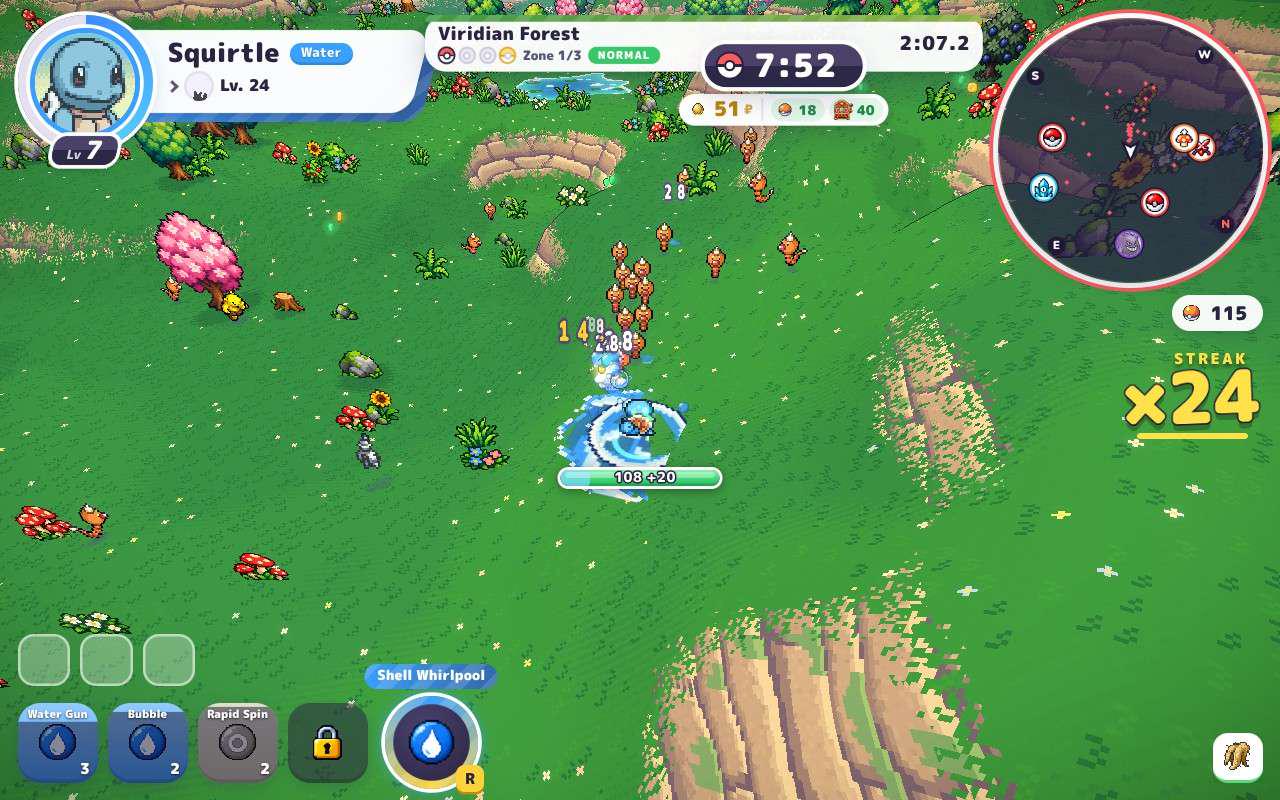
I managed to make PokeBonk work on Steamdeck (gaming mode). It runs very well but sometimes movement input is bugged and your Poke move some way until you choose this direction with analog stick (it gets bugged sometimes when you move and rotate camera). Other that that its completely playable
r/SteamDeck • u/varnajohn • 5h ago
For most of my childhood I only had a PC, and I was only used to using keyboard and mouse, controllers just felt less precise and harder for me. But at some point about 10ish years ago I got a controller just for Rocket League. Once I actually got comfortable with it I started using it for more games, eventually I came to prefer it over keyboard and mouse in pretty much anything that wasn’t in first person or some sort of strategy game with a lot of menus.
Never felt tempted to get a console, even during the era of exclusives I didn’t feel like I was missing out on anything. But when the steam deck came out I decided to get one, always been a bit of a valve fanboy and it kind of seemed like a PCish console in a way, basically a handheld PC (Though I never had any ambitions of using it for anything other than gaming). And I’ve been enjoying it way more than anticipated, especially for certain games I don’t ever wanna go back to playing on PC even with a controller. Most roguelites, metroidvanias and platformers pretty much feel like they were made for handheld, just using a controller with a screen (console or PC) can’t compare at all.
The best explanation I can come up with is that the screen is right there between your thumbs, it feels so tactile. It makes the controls feel more direct somehow, I guess it might have something to do with the fact that you can actually see your fingers while you play as well. I play way better, especially for fast paced or precise games.
Right now I’m revisiting Celeste a bit to see if I can beat some B side levels that I was struggling a few months ago, really determined to get actually good at this game this time around. Before that I played through Nine Sols, really hard but solid game, the combat especially felt great. I also have Croak on my radar, I tried out the demo a bit and it feels really nice, very smooth movement. It's a platformer with hand drawn graphics kind of like Cuphead but a more modern cartoon style, definitely gonna check that out when it comes out.
I still go back to the PC but pretty much only when my friends wanna play something multiplayer that I really can’t play well on the deck, mostly Counter Strike, Dota 2 and Deadlock. Other than that I stay away from my desk aside from work. I have a cozy couch setup and a nice little enclosed balcony with a hammock I sometimes use. It also feels so nice when I visit my family (they live 4 hours away) and I can just bring the deck for some gaming before bed.
I don’t even know if I would have been into gaming at this point in my life if I never got a steam deck. I really feel chained to my desk sometimes with how much work I need to do when we have some sort of crunch time, feels nice that my gaming hobby is separate from this now.
r/SteamDeck • u/CandyLoxxx • 8h ago
Is that too much to ask? Apparently so. Trying to play Farcry 5 and Watch Dogs 2 offline but I can’t because of the stupid launcher needing internet….and I remember you could launch it without internet but now you can’t…wtf is happening??? LAUNCHERS ARE SO ANNOYING. Isn’t Ubisoft working on a way to get rid of the launcher? I hope so
r/SteamDeck • u/softineon • 14h ago
For some reason, the VERY left-most edge of the right trackpad does not want to register any movement unlike anywhere else. I dont believe this is a hardware issue as this ONLY happens whenever im moving the cursor, be it during desktop mode or during a game. Whenever im using the keyboard or performing a calibration the entire trackpad works fine and i dont know what is causing this to happen ONLY in mouse mode and nowhere else
r/SteamDeck • u/Mstar_Okwah • 17h ago
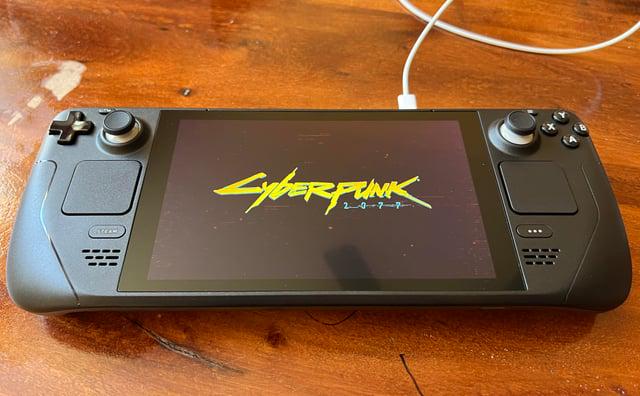
So I Just Bought Cyberpunk On GOG after watching edgerunners and am in need of help. I want to play on my deck but im not sure how?
I have Unifideck but it has serious issues for this game (It's horribly slow, audio issues when I move in menus, input delay, and anytime i use the steam menu it crops the screen). So im wondering if there's a better alternative to make it work Like maybe Heroic launcher or like specific settings.
r/SteamDeck • u/EarNo7438 • 1h ago
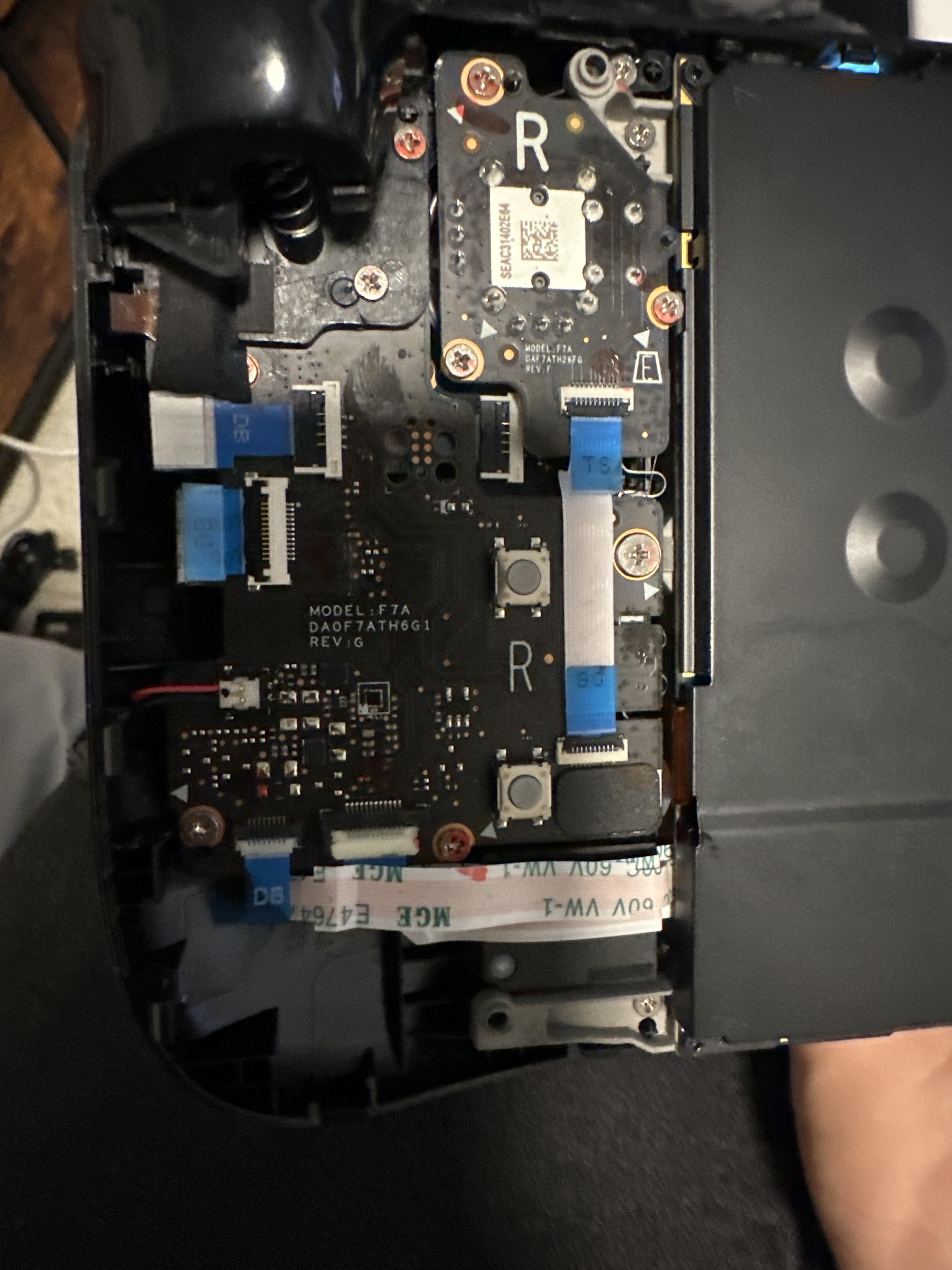
Hey guys, so after 3 years of everyday use my R button gave out and I was wondering if I should take it to a repair shop or just buy the daughter board online and replace it myself and what would be the best place to find that daughter board (I’m balling on a budget)
r/SteamDeck • u/DaVorShack • 5h ago
I have a pretty early steam deck LCD that has been giving me more and more issues over time. This is the most common one. Often after waking from sleep, I’ll get crashes like you see on this video. This is a VERY common occurrence. I have not seen other users have this same issue anywhere. It will attempt to reboot after the crash most times but almost never successfully boots. I have to hold the power button for 10 seconds to fully turn it off, and then power it back on to get it working again.
This happens whether I have a game running or not, but most frequently happens at the Home Screen like this. I have reflashed the disk to see if it could be a a software issue, and have also reflashed the bios to check if that’s a problem and have had no success. I’m guessing my motherboard is borked, but wondering if anyone else has seen this issue.
r/SteamDeck • u/Numerous_Roof_1070 • 9h ago
Hey guys! I just wanted to share that I uploaded a new version (v.1.3.1) on GitHub.
This new release contain two new features:
I added some screenshots of the app to show how it is right now and also one of my own library to show the family sharing ribbon on Leaf it Alone.
As some people may know, I'm developing this in CachyOS and unfortunately my only Family Sharing member is my wife and she owns only 5 games, so those games were cached on my machine. If possible, I'd like the feedback of someone that uses Windows/macOS and have family members in their Steam Family that have multiple games. This is important because a big library from a family member may not be cached when you download the userdata.json file and then some covers may not be correctly applied.
If anyone tests this and give me a feedback saying it didn't work I'll start working immediately in a solution.
Thank you guys for using my tool!
r/SteamDeck • u/purpleph4ntom • 2h ago
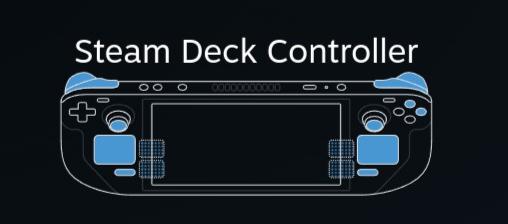
All buttons colored in blue are functioning. This happened recently and I don't know what caused this and what's the solution
r/SteamDeck • u/seru_mano • 20h ago
Made some adjuts to make metroid dread recomp project to run natively on linux, feel free to test it https://github.com/DaniSald/Metroid-Dread-Recomp
video with better quality: https://www.youtube.com/watch?v=w-ZUainH6PY
r/SteamDeck • u/Sockoou • 3h ago
After the newest update my steam deck OLED started randomly freezing on games when playing them.
The audio and my inputs are still going through but the screen is just stuck frozen, I can still hit the Steam button and bring up the menus and interface and everything still works just fine on that end.
But the only way I can fix my game is to force exit and relaunch it.
Has this been happening to anyone else? No I don’t have any 3rd party software on my Steam deck and I already went to Steam support and they basically just said that they’ll look into it.
r/SteamDeck • u/Temporary_Ad_5532 • 3h ago
Just got a steam deck and wondering what should I do to increase performance? Before anyone says to look it up, I have. I just want to know what people's experience is with things like lossless scaling before I purchase the program. Is there any other program I should get? Any tips would be great. Thank you!
r/SteamDeck • u/PagIbigAyKanibalism0 • 1d ago
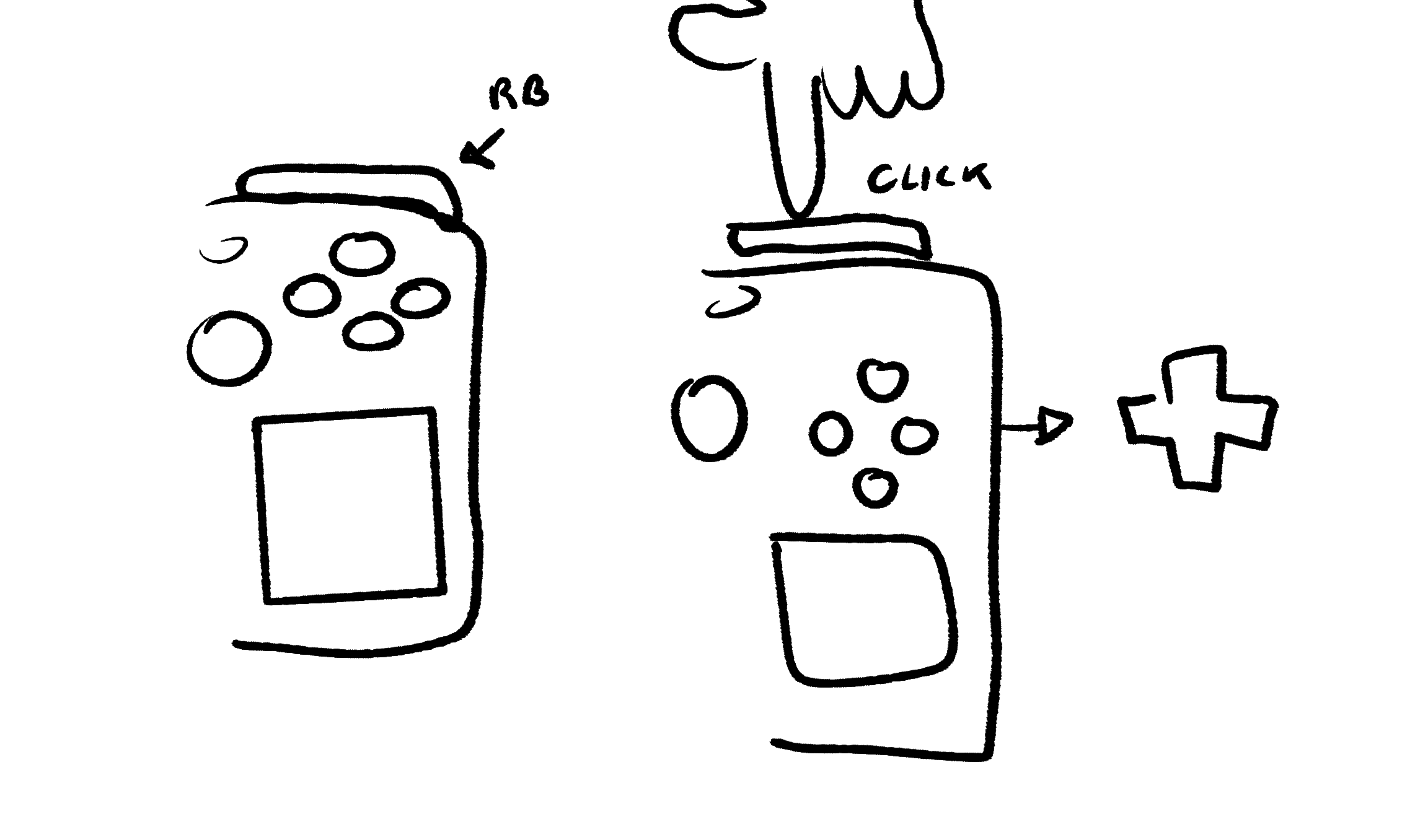
the dpad on the deck is kinda mega annoying to use, and its especially annoying for deadlock because the items are mapped to the dpad
basically i just want to make it so holding the rb will let me use the dpad on my face buttons and then swap back after i let go
and i know like it should be something with the action sets, but i just cant find how to make a new one? theres alreadynthree and im scared to edit it in fear i might mess something up
idk im just very confused and any help would be appreciated
r/SteamDeck • u/casualredditor98 • 2h ago
Can some recommend some ideal settings for resident evil village on the LCD, preferably something balanced that don't downgrade the graphics too much but at the same runs at 30-40 fps
r/SteamDeck • u/Kijichiro • 4h ago
Want to use the ipad as a monitor. I got the ugreen video capture card and now need an app for my ipad. I also got the dock so only the app is missing.
Pleae help me out
Edit; tested with Dongled app. Input lag lag very bad and played sf6 offline and it was very bad.
So in the steam menus everything is fine or minimal lag but in game it's unbearable
r/SteamDeck • u/gkaramanis • 1d ago
I got this idea for a screensaver that draws the Deck in wobbly lines. Claude Code wrote most of the code, I did the design and a lot of back and forth on the shapes, which were measured from Valve's CAD files.
Download, install steps and a browser demo on my website: karaman.is/blog/2026/10/doodle-deck
It should run on anything running SteamOS but I have only tested it on my Deck
r/SteamDeck • u/Far_Broccoli8247 • 4h ago
As the title says. Recently got on my deck to play Deadlock, a dash (L3 input) and a lag spike later I noticed that nothing happens anymore when I press L3.
Because of the weird lag spike I thought "eh maybe it's a problem with the game" and restarted the game only to notice it still doesn't work. When I open the pause menu, press the left thumbstick forward and exit the pause menu my character immidiately dashes so I figured the L3 is stuck sigh
Tested it in some other games and yeah it appears to be stuck, I tried carefully wiggling the stick outward to maybe get it unstuck which... surprisingly worked... for the next 5 times I pressed L3 and then it got stuck again.
My warranty is expired (for afaik it's 12 months), so what's the best way to tackle this? I thought about the obvious thumbstick replacement through ifixit, but is there a chance I can just get the tools and maybe fix the existing stick? Is there a chance that it just got stuck from some dust build-up? Should I replace it anyway even if the latter is the case? Is there a slim chance that it's a software problem?
From the outside, the L3 button looks and sounds normal for all I know. The stick sits at the same height as the right thumbstick and it does the normal clicking sound.
Is there a way to disable the button in the kernel or something so it doesn't mess with games or emulators, just temporarily until I can fix it? The thumbstick still does stick things after all.
r/SteamDeck • u/ghdcksgh • 1h ago
I’m trying to get decky sunshine to run in gaming mode but when i press run sunshine it says running for a bit then goes back to starting and gets stuck there. i have no clue why that is since i can run sunshine on desktop mode.
r/SteamDeck • u/worldsbestfrycook • 1h ago
Hi all. I'm like, so certain that my decky loader needs to be updated and it's causing the boot sequence to freeze after the steam deck logo appears. Is there a way I can boot to desktop from BIOS mode? Or better yet, delete decky loader?
r/SteamDeck • u/Intelligent_Pizza854 • 1h ago
Hello everyone.
I recently tried to turn on my Steam Deck after charging it from a drained battery. The battery charges fine, however when I go to turn it on, the screen is still black (no backlight either) and it won't display to an external monitor if I plug it into a dock. However, when it is on, I hear a chime when it is booting up, the haptics on the touch pads work, and after a few minutes of starting it up, the fans ramp up for a few seconds, and then turn back off for a few seconds.
I have tried the following, but none have worked:
I should mention as well that I am not using the official charger, but I am using an Anker 65W USB-C power adapter, and I have tried other USB-C chargers as well.
I also have contacted steam support, however they were not able to help me and said I would have to send it for repairs and gave me a price estimate of $185. I don't want to spend that type of money if it is something that I can fix myself.
Are there any other things that I can try to get it to work? Is it possible that the screen needs to be replaced, even though there isn't and visible damage to it? Or is it possible that the motherboard needs to be replaced?
EDIT: forgot to mention too that I have a Steam Deck OLED 512GB
r/SteamDeck • u/Hungry_Menace • 13h ago
I made a post yesterday about the loading user data issue and a few people who commented mentioned they use the Deck in desktop mode, and more than one person mentioned they use it for work, as do I.
It got me thinking, aside from the specific software needed for work - Libre office, Calculator, address book and possibly a second browser to keep work and personal stuff separate, what other software do you have on your Deck that isn't for Steam or gaming in general?