r/applehelp • u/hawking061 • 49m ago
iOS Do old iOS versions on certain iPhone models not work unless they have latest versions?
Are there certain types or models of iPhone that are more supported than others? Even newer ones?
r/applehelp • u/hawking061 • 49m ago
Are there certain types or models of iPhone that are more supported than others? Even newer ones?
r/applehelp • u/yeonstars • 1h ago
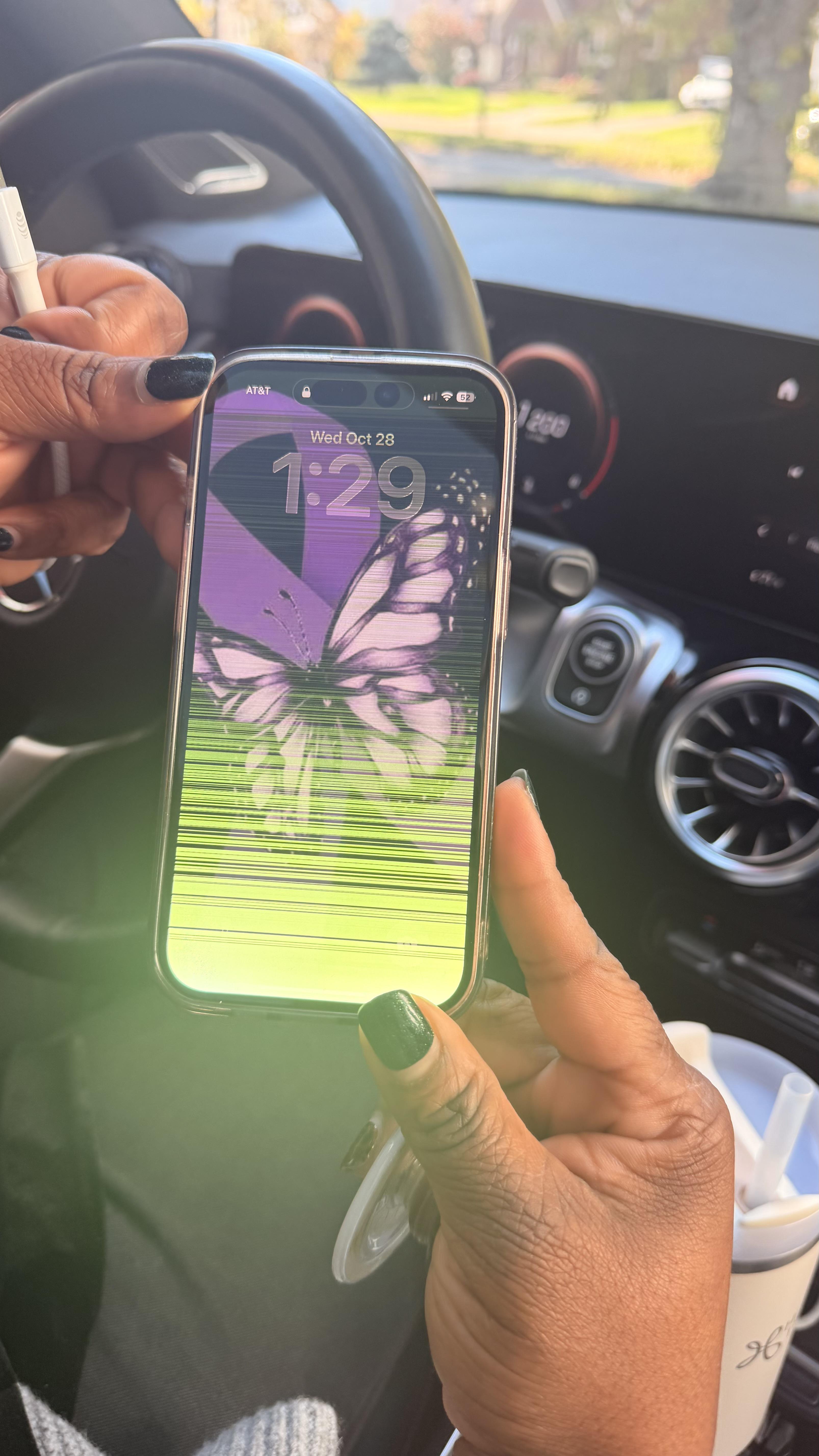
This is my moms phone, she says it started about 3 weeks ago, she got the phone in 2024. She says she can still use the touchscreen and can still type, and it happens everyday, but then disappears for a while. Does anyone know what causes this and how to fix it? Thanks.
r/applehelp • u/cng2112 • 3h ago
My wife and I have an Apple TV 4K and for years we've each connected to the Apple TV and used the Share Audio feature with our separate AirPods to watch and listen together and that all works fine. The annoying thing is that if one of us wants to independently increase or decrease their AirPods volume, you have to use the remote, press the TV/Control Center button, tap over to the AirPods icons, tap down to the AirPods in question, and then change the volume slider. It's distracting while you're in the middle of a show or movie.
So, I was thinking about getting each of us new AirPods Pro 2, Pro 3, or AirPods 5 that have the volume control on the stem. But I'm trying to confirm whether that volume stem control functionality extends to when two sets of these particular AirPods are connected to an Apple TV using shared audio?
Any experiences with this use case would be appreciated.
r/applehelp • u/Well-RoundedSquare • 0m ago
r/applehelp • u/flolucious • 5h ago
Hey everyone,
I recently received a refurbished iPhone.
In Settings → Parts & Service History, it prompts me to "Finish TrueDepth Camera Repair" (see screenshots). Whenever I try to run the on-device configuration, it reboots and fails with:
"Configuration Failed: There may be an issue with the server or network. Try again later."
Here is the weird part:
Wi-Fi is stable, multiple reboots didn't help.
Has anyone encountered this specific issue? Is the RGB sensor simply disconnected / dead, or does iOS block the camera stream until the Repair Assistant successfully pairs with Apple servers? Any known fix before I return it?
Thanks!
r/applehelp • u/kneetoekneetoe • 4h ago
Hi,
I have done Apple trade-in's where you send it in, and they email you a code to redeem for Apple account credit. Can anyone who has used the in-store option tell me whether the same thing is done in-store? If not, how do they pay it? I do not want instant credit to my Apple account, I want a code to redeem (long story why).
Thanks!
r/applehelp • u/DesignDrama • 45m ago
r/applehelp • u/ComedyBits • 47m ago
The "Add Signature" function in Preview seems to be a stub that hasn't been worked on in years. We don't have a decent trackpad, drawing with a finger results in a scribble, and using the camera or phone camera to photograph a signature doesn't get good results.
I have a very nice .png of each of our signatures, but there doesn't seem to be a way to paste it into most PDFs. I've tried the double copy-paste method, but it doesn't work on most docs we've wanted to sign.
Anyone had better luck with this? Anyone found the location in the system where the signature files are stored, and know what file format they use? It's sort of frustrating that images of sigs can't be imported in a straightforward way!
r/applehelp • u/hawking061 • 52m ago
r/applehelp • u/quiet_dear • 4h ago
Bought a new m5 MacBook air to replace my m1 MacBook air. I used migration assistant overnight and the setup seems to have gone smoothly. But when it is prompting me to log into my apple account, I am getting this error and it won't let me log in - either on my old laptop or the new one (phone is still logged in though). Help!
r/applehelp • u/Altruistic_Day_6833 • 1h ago
Hope your day is bright,
I think the iPad 9 is the best iPad! (My opinion ofc)
I use it daily, it has impressive hardware and honestly
is very multi-functional. I am a headphone jack, lighting
and Home button fan, so the iPad 9 is perfect for that.
But something I noticed is that whenever I use it when
it is charging, it occasionally shocks me through the
veery right side of my screen, near the charging port!
Did anyone else using iPad 9 notice that? It gets even
worse when you have static charge. Maybe my charger
has poor insulation.
What do you guys think?
(Also, by the right side of my screen, yes, I am talking about
when I click there and it shocks me.)
r/applehelp • u/Busy_Paramedic5181 • 5h ago
Hi everyone,
I recently bought a second-hand MacBook and set it up myself. The Mac currently boots normally, and I can access the desktop and use it without any problems.
I created my own Apple Account, but when I tried to sign in, I received an email from Apple saying:
“We’ve reviewed your request, and access to your account has been denied.”
Now, whenever I try to sign in on my Mac, I get an “Unknown error.” The account recovery page also says my account is locked. My name and email address are still visible in System Settings, but I can’t properly sign in or sign out.
I’m not sure what to do next, and I’m worried about making things worse.
What would you recommend doing in this situation? Should I contact Apple Support, check something on the Mac itself, or take another approach? I don’t want to reset or reinstall macOS and risk losing access to the device.
Has anyone experienced something similar? I’d really appreciate any advice on how to resolve this.
Thanks!
r/applehelp • u/Specialist_Buy_4051 • 5h ago
i want to add my siblings phone on my devices tab on find my but no matter what i try it doesn’t show up on my devices. he regularly loses his phone so i can never really make it ping to find it easier. (his find my is turned on in settings)
r/applehelp • u/FinalElk4032 • 2h ago
​
Hi everyone! I recently got a MacBook Neo and am having trouble with Universal Clipboard and AirDrop when transferring things from my iPad to my Mac.
My setup:
\- MacBook Neo
\- iPad (11th generation)
The problem:
✅ MacBook Neo → iPad
\- Universal Clipboard works perfectly for both text and images.
\- AirDrop works perfectly.
❌ iPad → MacBook Neo
\- Universal Clipboard doesn't work for either text or images.
\- When I copy something on my iPad and paste it on my Mac, it pastes the old clipboard content instead.
\- AirDrop from iPad to MacBook Neo is working .
Since everything works in the Mac-to-iPad direction, I'm confused about why the reverse direction doesn't work.
Has anyone experienced this issue? Could this be a macOS or iPadOS bug, a setting I missed, or a problem with my MacBook Neo?
I'd appreciate any troubleshooting steps or suggestions. Thanks! 😄❤️
r/applehelp • u/First_Astronomer_198 • 2h ago
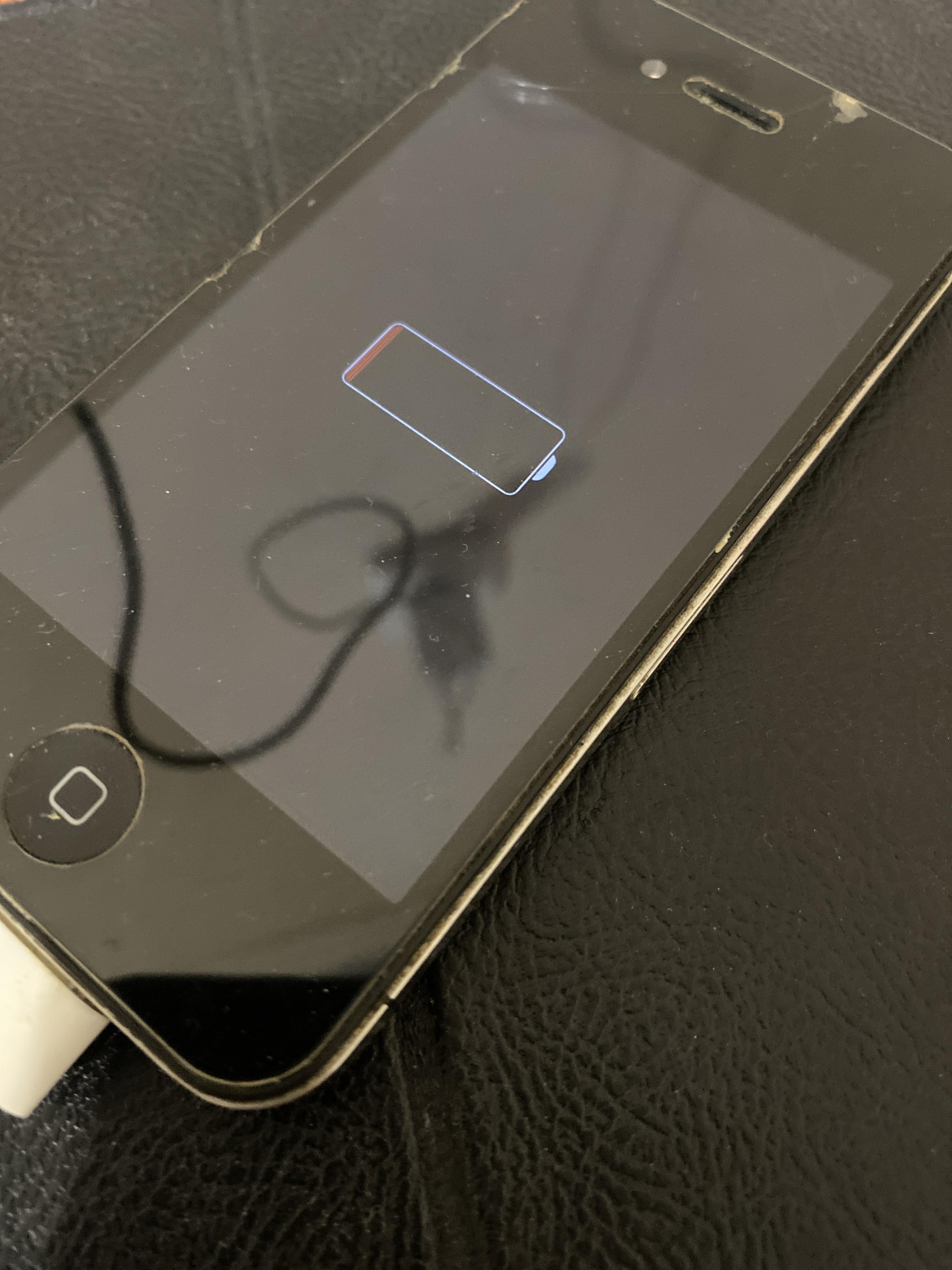
Today I got my old iPhone 4 which I didn’t used over 6 years, maybe 8. I wanted to check what does it have, so I tried to charge the phone. The phone displayed the Apple logo, went dark, showed it again, went dark once more, and then started charging, but in 2 hours nothing changed. I mean, I can see only that battery is low. The AI said that the phone might be in a deep sleep state, and I can try to wait, but will it work? Maybe it already dead?
r/applehelp • u/Masterpiece2716 • 3h ago
r/applehelp • u/Dangerous_Smile2416 • 9h ago
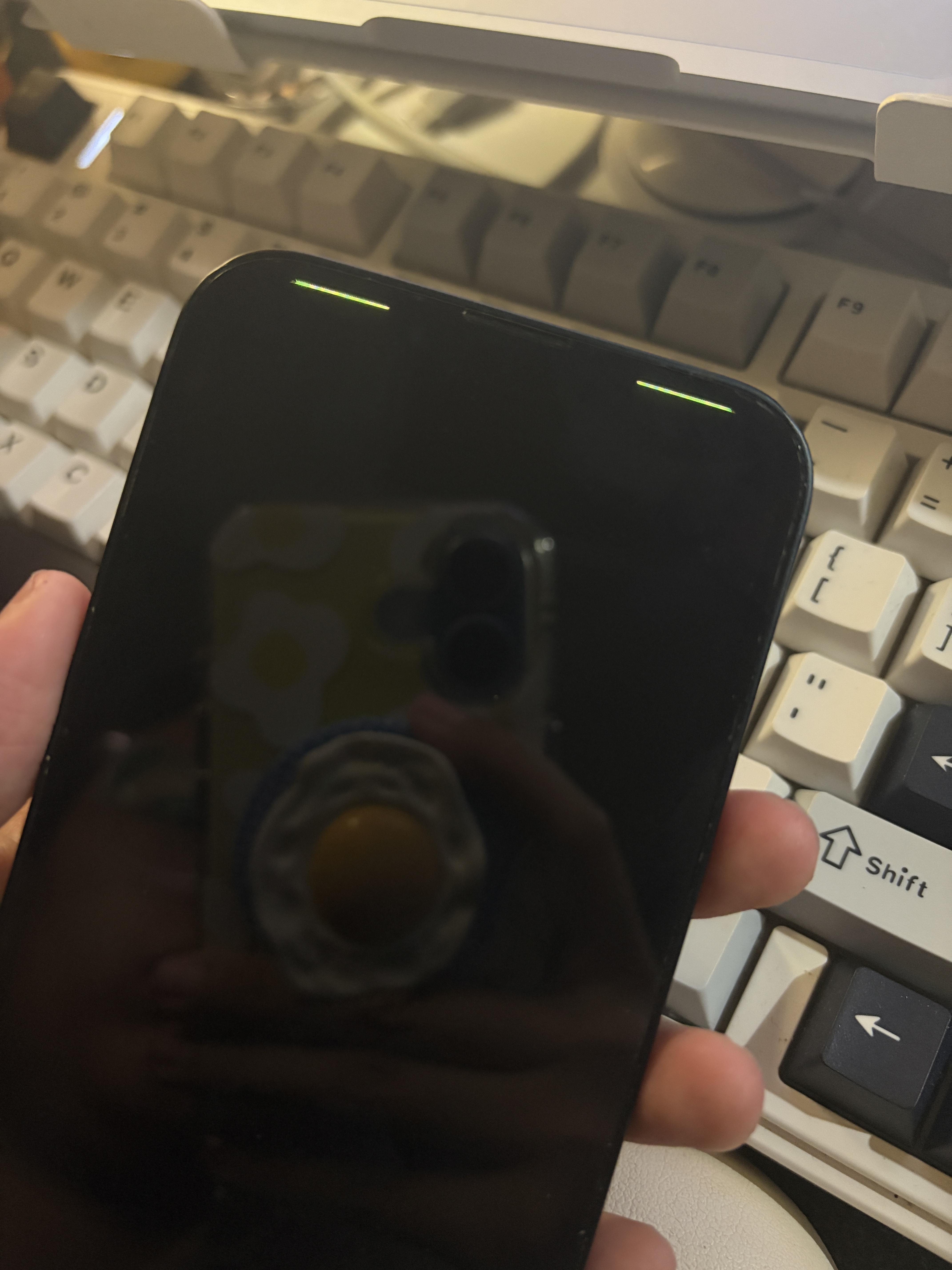
Out of the blue my ip13 went black and the remaining light it shown on the pic. It didn’t fall or something as it’s only my house phone. Please help.
r/applehelp • u/Desperate-Living-242 • 45m ago
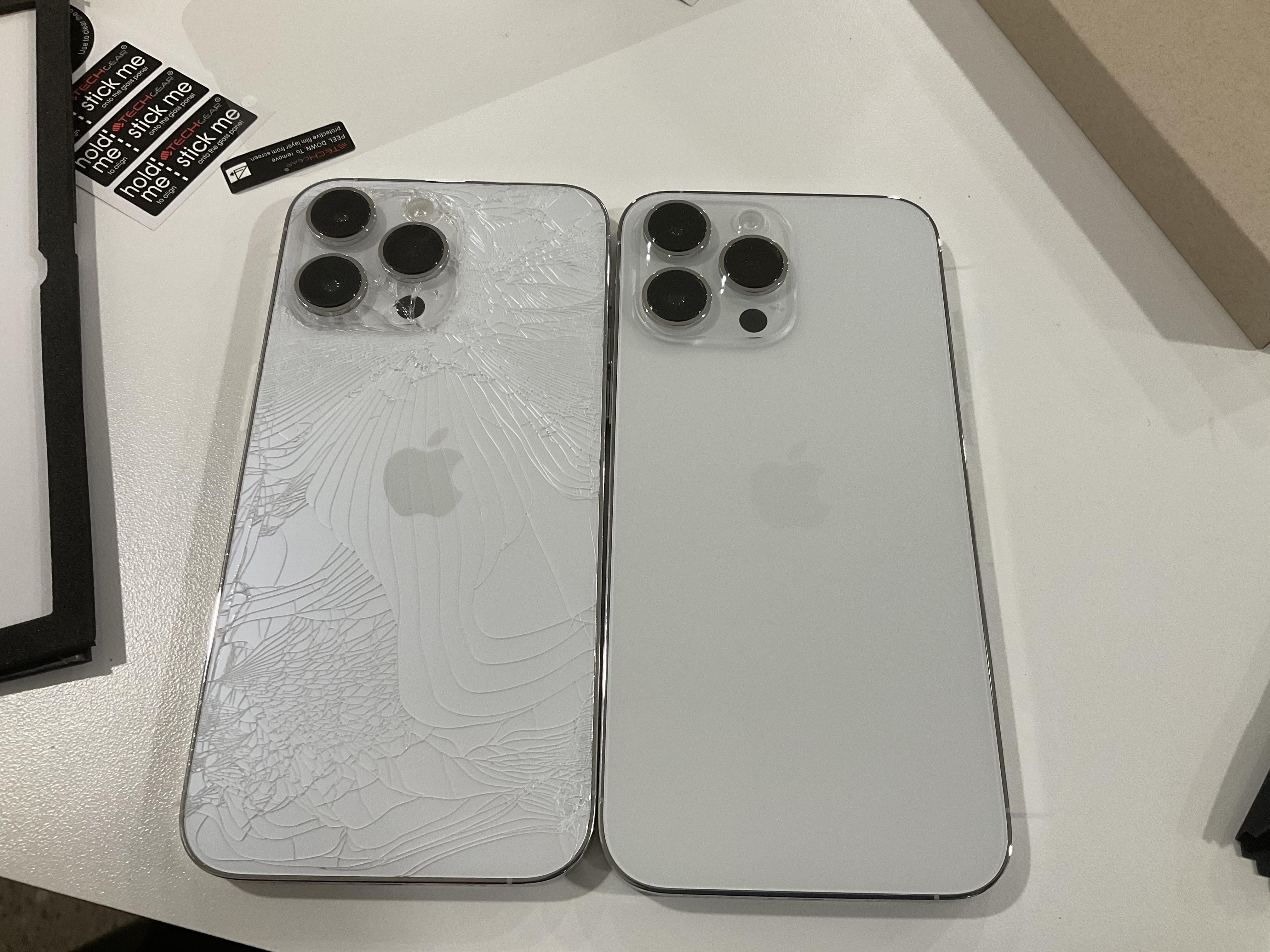
I just received my apple care replacement for the iPhone 14 pro max and I can’t help but notice that the colours are slightly different. The new replacement that they sent me seems to be more of a greyish off-white.
Can someone let me know if my eyes are deceiving me and if there’s anything I can do about it?
r/applehelp • u/Key-Monk6159 • 4h ago
1st Gen AirTag bought years ago as part of a 4 pack. Tried to set up the last one today and had to change the battery. The first page of the set up says that it’s linled to my Apple account (email and phone number are correct).
However when I click Agree I get a page that says This AirTag is Connected to Another Apple Account. I can’t find it in Find My app (all the others are there). I tried to reset it by pulling the battery 4-5 times but still nothing. The only thing kind of different is that a while back I did change my iCloud email to an .icloud one but all of the other devices are showing. The other thing is when I originally set them up I names them AT-1, AT-2, etc. This one is AT-4 and it does show it when first trying to set it up after the battery change and reset - I would have thought that after a reset it would remove the name.
We do have a family plan with 2 people but it doesn’t show up on any of their Find My. The Learn More says to have the “owner” remove it but there’s no other owner and never has been.
Any suggestions? They are cheap enough so I’ll buy another but before then I wanted to see if I was missing something.
r/applehelp • u/Josh000_0 • 4h ago
On macOS 27.0.1, under System Settings > Privacy & Security > Files & Folders, I have an app (an MCP) listed with a sub-permission toggle called “Data shared by Things and affiliated apps” (the fine-grained inter-app data-sharing category, not classic Full Disk Access). The toggle won’t switch on no matter what I try; fully quitting the requesting app and confirming no helper processes remain in Activity Monitor, restarting System Settings, and a full reboot. Toggle is still stuck off. Tapping the toggle produces zero response (no password/Touch ID prompt, no animation, nothing). If i drag the toggle to the right it just bounce back to the off position.
The odd part: it’s not isolated to one app. A second, unrelated, properly-signed CLI tool (uvx, from the uv Python package manager) has the identical toggle, same category, also stuck off in the same pane. Both items otherwise show as correctly installed.
Anyone else hit this specific Files & Folders sub-toggle issue on 27.0.1? Known fix, or confirmed OS bug worth reporting?
r/applehelp • u/SpecificCriticism410 • 5h ago
Why does my alarm go off super quietly? It’s inconsistent- one day it will work, most days it goes off super quietly, most of the time it does vibrate, today it didn’t do anything except show the alarm screen.
I’ve tested it out by setting an alarm a minute or two in advance, so I know it’s not me sleeping through it.
I’ve tried
1. Turning off “adjust with button” for the alarm volume and leaving it all the way up
2. Turning off whatever setting makes it quiet when you look at it
3. Turning off the volume adjust thing (for when it thinks a sound is too loud for your environment)
4. Adjusting the ringtone and alarm volumes separately and together
5. Having a regular alarm vs. one in the Apple “sleep cycle”
6. With and without my sleep dnd.
My notifications all go off with sound.
My phone is not on silent.
iPhone 17, iOS 27.0.1
It’s been significantly worse since the last update. Could this be related?